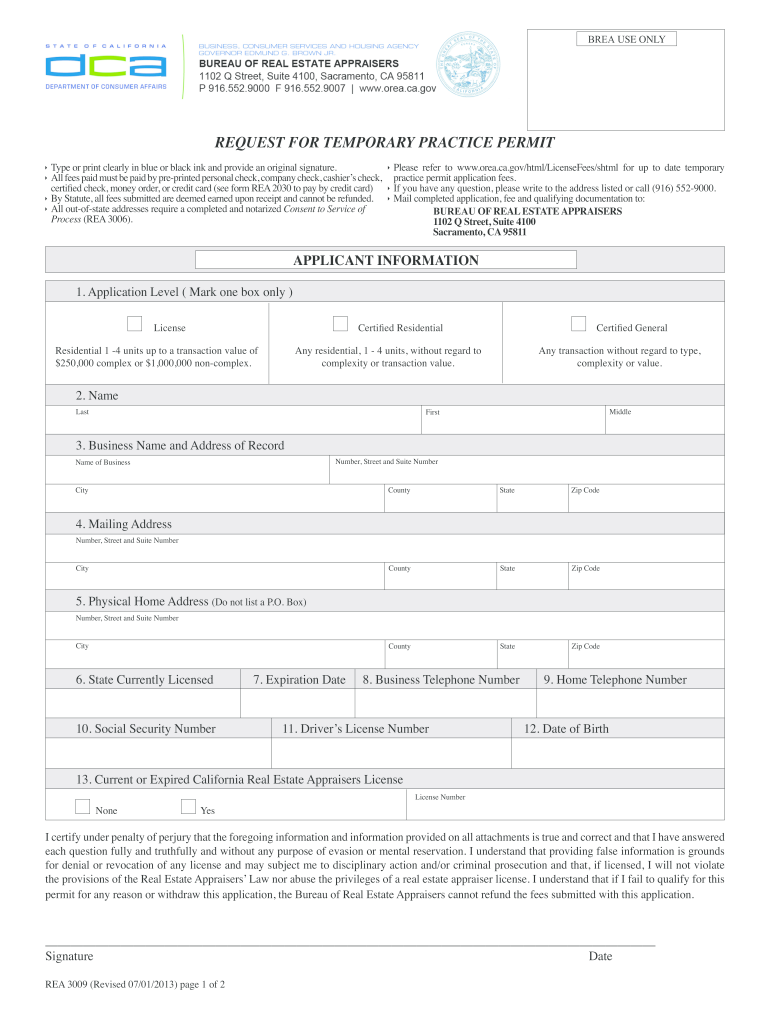
up to date temporary Í All fees paid must be paid by pre-printed personal check, company check, cashier’s check, practice permit application fees. certified check, money order, or credit card (see form REA 2030 to pay by credit card) Í If you have any question, please write to the address listed or call (916) 552-9000. Í By Statute, all fees submitted are deemed earned upon receipt and cannot be refunded. Í Mail completed application, fee and qualifying documentation to: Í All out-of-sta.

Open form follow the instructions

Easily sign the form with your finger

Send filled & signed form or save
How to fill out the CA REA 3009 online
Filling out the CA REA 3009, the request for temporary practice permit, is a vital step for real estate appraisers seeking to operate temporarily under California regulations. This guide provides clear, step-by-step instructions to assist you in successfully completing the form online.
Follow the steps to complete the CA REA 3009 online
- Press the ‘Get Form’ button to obtain the CA REA 3009 and open it in your preferred online editor.
- Select the appropriate application level by marking one box. Choose from license options such as residential, certified residential, or certified general.
- Enter your name clearly in the designated fields: last name, middle name, and first name.
- Fill in the business name and address of record, ensuring to include the name of your business, street address, city, county, state, and zip code.
- Provide your mailing address if it differs from your business address, including the street address, city, county, state, and zip code.
- Complete your physical home address accurately, avoiding the use of a P.O. Box, rural route, or star route.
- Indicate the state or states where you currently hold a real estate appraisal license.
- Input the expiration date of your current license.
- Provide your business telephone number, ensuring it is a number that can be publicly recorded.
- Fill in your home telephone number.
- Enter your social security number, which is required for processing your application.
- List your driver’s license number along with the state where it was issued.
- Provide your date of birth in the specified format.
- Indicate if you currently hold or have ever held a California real estate appraiser license by selecting 'Yes' or 'No' and providing your license number if applicable.
- Read the certification statement and sign the application, ensuring to date it appropriately.
- Remember to include the Consent to Service Process Form (REA 3006) along with your application.
- Finally, save your changes, download the completed form, print it, or share it as needed.
Start your application process by filling out the CA REA 3009 online today.
Experience a faster way to fill out and sign forms on the web. Access the most extensive library of templates available.
Related content
Check this box if you are married to, or are in a domestic partnership or other legal...
Aug 22, 2019 — Nonstructural life safety upgrades were completed under project numbers...
In Monitor Mode, the EntryRAE samples the environment and displays real-time readings for...
Get answers to your most pressing questions about US Legal Forms API.
How to claim $7500 EV tax credit in California?
To claim the $7500 EV tax credit in California, you must fill out the appropriate IRS forms when filing your annual tax return. Make sure to maintain all necessary documentation to support your claim. Learning about the details outlined in CA REA 3009 can guide you through the claiming process.
Does California have an EV tax credit?
Yes, California offers an EV tax credit designed to provide financial relief for electric vehicle owners. This tax credit is available to those who meet specific eligibility criteria when filing their taxes. This initiative is part of the broader CA REA 3009 to promote sustainable driving in the state.
How to get California EV credit?
To receive California EV credit, you must complete the required paperwork when purchasing an electric vehicle. This credit can be applied at the point of sale or claimed through your tax return. Understanding the requirements of CA REA 3009 can help ensure you maximize your benefits.
Where to get California Secretary of State entity number?
To obtain your California Secretary of State entity number, you can visit the California Secretary of State's website. Once there, you can search for your business by name or use their online services. This process is essential for complying with requirements under CA REA 3009.
How to fill out a sales tax exemption certificate?
Filling out a sales tax exemption certificate requires entering your business's name, address, and the reason for the exemption. Specify the type of items covered by the exemption and include any applicable permit numbers. For further guidance, the CA REA 3009 provides essential insights to ensure that your exemption is valid and properly documented.
Can you file CA statement of information online?
Yes, you can file the CA statement of information online through the California Secretary of State's website. This online service allows you to complete the filing quickly and efficiently. Additionally, leveraging USLegalForms can provide you with the necessary tools and templates to ensure compliance with CA REA 3009.
How to file California corporate disclosure statement online?
The online filing for a California corporate disclosure statement can be done through the California Secretary of State's website. Simply select the appropriate form, fill it out with accurate information, and submit it digitally. For added convenience, USLegalForms offers resources to support you in meeting the CA REA 3009 requirements.
How long does it take to become a real estate appraiser in California?
Becoming a real estate appraiser in California typically takes several months to a few years, depending on your educational background and the licensing process. You must complete required coursework, gain experience, and pass the state exam. This journey is guided by regulations that align with the CA REA 3009 standards to ensure quality appraisals.
How to file a complaint against a property management company in California?
If you need to file a complaint against a property management company in California, start by documenting your issues. Next, file your complaint with the California Department of Consumer Affairs. Using USLegalForms can provide resources to ensure your complaint aligns with the judicial standards set forth by CA REA 3009.
How to file form SI 100 in California?
To file Form SI-100 in California, begin by gathering the necessary information about your corporation. You can fill out the form online on the California Secretary of State's website or download it for mailing. For a smooth experience, utilizing USLegalForms can help simplify compliance with the CA REA 3009 guidelines.
Use professional pre-built templates to fill in and sign documents online faster. Get access to thousands of forms.
If you believe that this page should be taken down, please follow our DMCA take down process here.
This form is available in several versions. Select the version you need from the drop-down list below.