Loading
Get Requesting Tax Forms - Wisconsin Department Of Revenue
How it works
-

Open form follow the instructions
-

Easily sign the form with your finger
-

Send filled & signed form or save
How to fill out the Requesting Tax Forms - Wisconsin Department Of Revenue online
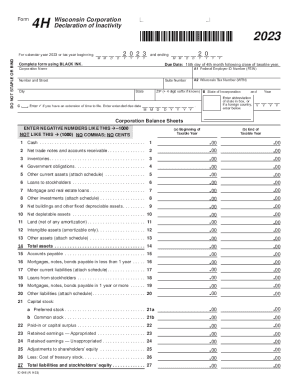
This guide provides clear, step-by-step instructions for filling out the Requesting Tax Forms, specifically Form 4H from the Wisconsin Department of Revenue. Designed to assist users of all experience levels, the guide ensures a straightforward completion process for those requesting tax forms online.
Follow the steps to successfully complete Form 4H online.
- Press the ‘Get Form’ button to access the form for completion online.
- Enter the federal employer identification number (FEIN) or the Wisconsin tax number (WTN) in field A1 and A2, respectively.
- Provide the corporation name, along with the full address including number, street, suite number, city, and ZIP code.
- Indicate the state of incorporation in section B.
- If applicable, check the box in section C to indicate any extension of time to file and provide the extended due date.
- For the balance sheet section, fill out the beginning and end of taxable year figures by entering the appropriate values in the specified lines. Ensure to enter negative numbers correctly, as instructed.
- Complete all necessary financial entries, including cash, accounts receivable, inventories, and other assets as outlined on the form.
- Once all fields are filled, review the balance sheets to ensure accuracy.
- Provide contact information for a representative, including their name and telephone number.
- The designated officer must sign and date the form to declare the corporation's inactivity for the taxable year.
- After finalizing the form, save your changes, then download, print, or share the completed form as required.
Complete your tax forms online efficiently and ensure compliance with Wisconsin tax regulations.
Related links form
Due to the Social Security Number no longer being visible, the IRS has created an entry for a Customer File Number. This is an optional entry that can be used by third parties to match a transcript to a taxpayer. The Customer File Number will be located on line 5b of the Transcript Request Form.
Industry-leading security and compliance
US Legal Forms protects your data by complying with industry-specific security standards.
-
In businnes since 199725+ years providing professional legal documents.
-
Accredited businessGuarantees that a business meets BBB accreditation standards in the US and Canada.
-
Secured by BraintreeValidated Level 1 PCI DSS compliant payment gateway that accepts most major credit and debit card brands from across the globe.