Loading
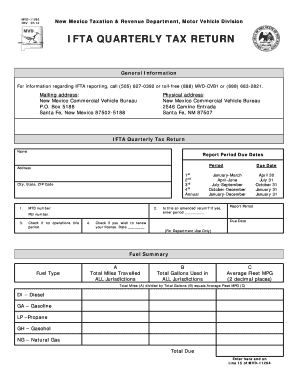
Get For Information Regarding Ifta Reporting, Call (505) 827-0392 Or Toll-free (888) Mvd-cvb1 Or (888)
How it works
-

Open form follow the instructions
-

Easily sign the form with your finger
-

Send filled & signed form or save
How to fill out the For Information Regarding IFTA Reporting, Call (505) 827-0392 Or Toll-free (888) MVD-CVB1 Or (888) online
Filling out the IFTA Quarterly Tax Return can seem daunting, but this guide will walk you through each section to ensure accurate reporting. With clear instructions, you will be able to complete the form confidently and efficiently.
Follow the steps to successfully complete your IFTA Quarterly Tax Return.
- Click ‘Get Form’ button to obtain the form and open it in the editor.
- Begin by entering your name in the designated field at the top of the form. This identifies the individual or business completing the return.
- Next, provide your mailing address including street address, city, state, and ZIP code. This ensures that any correspondence regarding the report is sent to the correct location.
- Indicate the report period by checking the appropriate box for the quarter you are reporting (1st, 2nd, 3rd, or 4th) or for the annual period.
- Fill in your MTD number and FEI number in the specified sections. These identifiers are important for tracking your account.
- If you had no operations during this reporting period, check the box labeled ‘Check if no operations this period.’
- If you wish to renew your license, check the corresponding box and enter the date of renewal request.
- In the fuel summary section, report the total miles traveled in all jurisdictions in the first column labeled ‘Total Miles Travelled ALL Jurisdictions.’
- In the next column, enter the total gallons of fuel used in all jurisdictions.
- Calculate the Average Fleet MPG by dividing the total miles (from step 8) by the total gallons (from step 9) and record this result in the Average Fleet MPG column, ensuring two decimal places.
- Complete the Total Due section by entering the amount calculated, and ensure to carry this amount over to Line 15 of MVD-11264.
- Review all entered information for accuracy. Once confirmed, save changes to your filled-out form.
- You may then download, print, or share the form as necessary to meet your reporting obligations.
Start filling out your IFTA Quarterly Tax Return online today to ensure timely compliance with reporting requirements.
Special Fuel Permit If the driver does not present a valid IFTA Decal or License and the vehicle is special fuel powered: A $5.00 TEMPORARY SPECIAL FUEL PERMIT fee will be assessed. The permit is valid for up to forty-eight (48) hours (or one entry and one exit of the state).
Industry-leading security and compliance
US Legal Forms protects your data by complying with industry-specific security standards.
-
In businnes since 199725+ years providing professional legal documents.
-
Accredited businessGuarantees that a business meets BBB accreditation standards in the US and Canada.
-
Secured by BraintreeValidated Level 1 PCI DSS compliant payment gateway that accepts most major credit and debit card brands from across the globe.