Loading
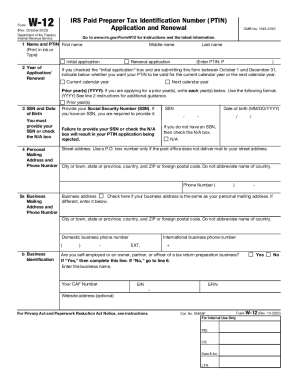
Get About Form W-12, Irs Paid Preparer Tax Identification ...
How it works
-

Open form follow the instructions
-

Easily sign the form with your finger
-

Send filled & signed form or save
How to fill out the About Form W-12, IRS Paid Preparer Tax Identification Number application online
Filling out the About Form W-12 is an essential step for individuals seeking to apply for or renew their IRS Paid Preparer Tax Identification Number (PTIN). This guide provides clear, step-by-step instructions tailored for users of all experience levels, ensuring the process is straightforward and effective.
Follow the steps to successfully fill out the About Form W-12 online.
- Click ‘Get Form’ button to obtain the About Form W-12. This action will open the form for you to complete online.
- In section 1, enter your first name, middle name, and last name. Indicate whether this is an initial application or a renewal.
- In section 2, provide the year of your application or renewal, indicating if you want your PTIN to be valid for the current or next calendar year.
- In section 3, enter your Social Security Number (SSN) and date of birth. If you do not have an SSN, check the N/A box.
- In section 4, fill in your personal mailing address and phone number, ensuring to include your city, state, and ZIP code.
- In section 5, provide your business address if it differs from your personal address, and check the box accordingly.
- In section 6, enter the email address that should be used for communication regarding your application.
- In section 7, indicate whether you have had any felony convictions in the past 10 years, and provide any necessary explanations.
- In section 8, provide the address used on your last U.S. individual income tax return or check if you have never filed.
- In section 9, select your filing status from the options provided and indicate the tax year related to your last tax return.
- In section 10, indicate if you are current on both individual and business federal taxes, providing explanations if not.
- In section 11, acknowledge your awareness of the necessity for a data security plan as a paid tax return preparer.
- In section 12, check the applicable professional credentials and ensure expiration dates are filled correctly.
- In section 13, note that the application processing fee of $19.75 must be included, ensuring separate checks for different years.
- Once all sections are completed, review your information for accuracy and completeness, then sign and date the form.
- Finally, save any changes made, and consider downloading or printing a copy for your records.
Complete your About Form W-12 online to obtain or renew your PTIN efficiently.
§ 301.7701-15 Tax return preparer. (a) In general. A tax return preparer is any person who prepares for compensation, or who employs one or more persons to prepare for compensation, all or a substantial portion of any return of tax or any claim for refund of tax under the Internal Revenue Code (Code).
Industry-leading security and compliance
US Legal Forms protects your data by complying with industry-specific security standards.
-
In businnes since 199725+ years providing professional legal documents.
-
Accredited businessGuarantees that a business meets BBB accreditation standards in the US and Canada.
-
Secured by BraintreeValidated Level 1 PCI DSS compliant payment gateway that accepts most major credit and debit card brands from across the globe.