Loading
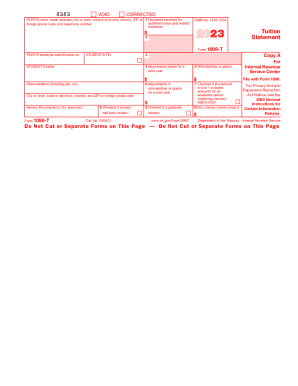
Get 2023 Form 1098-t. Tuition Statement
How it works
-

Open form follow the instructions
-

Easily sign the form with your finger
-

Send filled & signed form or save
How to fill out the 2023 Form 1098-T. Tuition Statement online
Navigating the 2023 Form 1098-T is essential for students seeking to claim education credits. This guide will provide clear, step-by-step instructions to assist you in completing the form accurately and efficiently online.
Follow the steps to complete the 2023 Form 1098-T online.
- Click ‘Get Form’ button to obtain the form and open it in the editor.
- In the top section, enter the filer's details, including their name, street address, city or town, state, ZIP code, and telephone number. Make sure to include the filer's employer identification number (EIN).
- Fill in the student’s information by entering their taxpayer identification number (TIN), name, street address (including apartment number, if applicable), city or town, state, and ZIP code.
- Complete Box 1 by entering the total amount of payments received for qualified tuition and related expenses during the year. Ensure this amount reflects any reimbursements or refunds made during the same period.
- Refer to Box 4 for any adjustments made for a prior year, if applicable. This may impact the education credit for that year.
- In Box 5, list the total scholarships and grants that have been administered by the institution. This should reflect all applicable assistance received.
- If there were any adjustments to scholarships or grants from a prior year, record that amount in Box 6.
- Indicate in Box 7 if the amount in Box 1 includes charges for any academic periods beginning in January to March 2024.
- For Box 8, check the box if the student was enrolled at least half-time during the reporting period.
- In Box 9, check the box if the student is pursuing a graduate-level degree or credential.
- Complete Box 10 if there were any reimbursements or refunds from an insurer for qualified tuition and related expenses.
- Once all fields are completed, carefully review the form for accuracy. Users can then save changes, download the completed form, print it, or share it as required.
Complete your forms online today to ensure accurate reporting and maximize your education credits.
Second, the information on the 1098-T form may be used to determine if any scholarships or grants you received during the tax year are taxable. If the scholarships or grants exceed your qualified tuition and related expenses, the excess amount may be taxable as income.