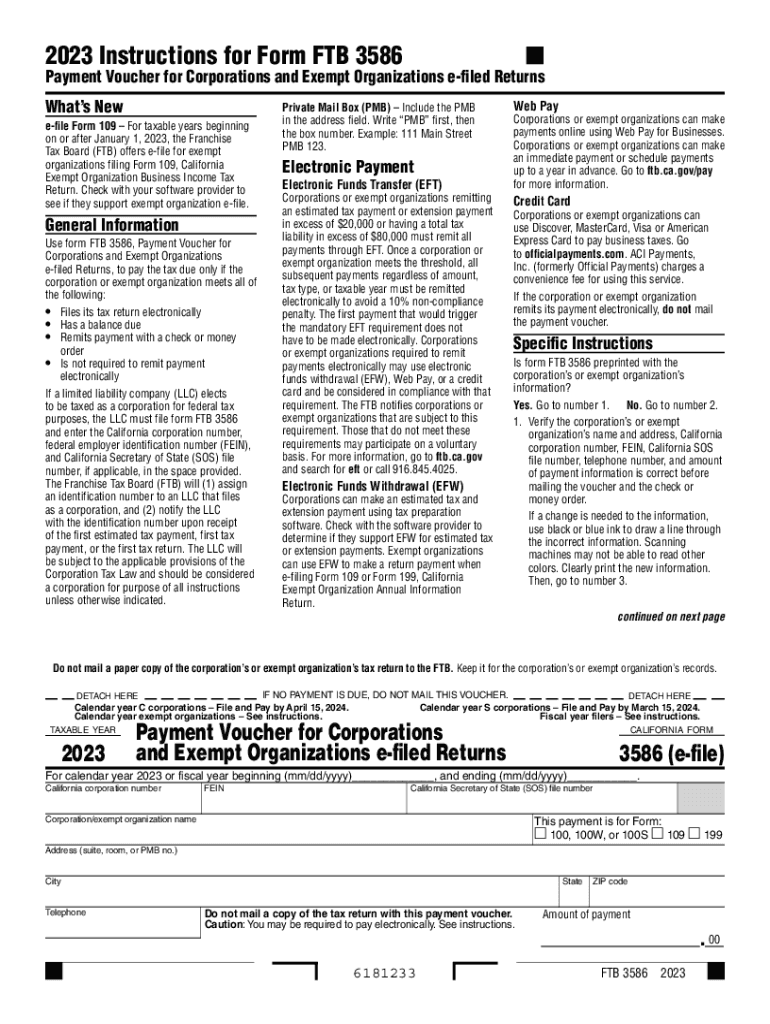
2023 Instructions for Form FTB 3586Payment Voucher for Corporations and Exempt Organizations efiled Returns Whats New efile Form 109 For taxable years beginning on or after January 1, 2023, the Franchise Tax.
Loading

Open form follow the instructions

Easily sign the form with your finger

Send filled & signed form or save
How to use or fill out the Form 3586: Fill Out & Sign Online online
This guide provides clear and supportive instructions for users filling out the Form 3586, Payment Voucher for Corporations and Exempt Organizations. Whether you are a first-time user or require a quick refresher, this guide will help you navigate the form with ease.
Follow the steps to complete the Form 3586.
- Click the ‘Get Form’ button to obtain the form and open it in the editor.
- If the form is preprinted with your corporation’s or exempt organization’s information, verify that the name, address, California corporation number, federal employer identification number (FEIN), California Secretary of State (SOS) file number, and telephone number are accurate. If any changes are needed, use black or blue ink to cross out incorrect information and clearly print the new information.
- If the information is not preprinted, complete the voucher using black or blue ink. Enter your organization's name and address in capital letters, along with the California corporation number, FEIN, SOS file number, telephone number, and the amount of payment.
- Ensure that the information entered on Form 3586 matches the information transmitted electronically to the Franchise Tax Board and the printed version of the tax return.
- Make the payment by preparing a check or money order payable to the ‘Franchise Tax Board’. Include the California corporation number, FEIN, California SOS file number, and indicate ‘2023 FTB 3586’ on the check or money order.
- Enclose the check or money order with the voucher—do not staple. Use the following mailing address: Franchise Tax Board, PO Box 942857, Sacramento CA 94257-0531.
- After completing the steps, you can choose to save changes, download, print, or share the form as needed.
Complete your documents online effortlessly and ensure compliance with all requirements.
Experience a faster way to fill out and sign forms on the web. Access the most extensive library of templates available.
Related content
Apr 18, 2023 — 2022 Instructions for Form FTB 3586. Payment Voucher for Corporations and...
Mar 8, 2023 — Complete list of forms you can e-file 12. Mandatory e-file ... Payment...
Apr 18, 2023 — 2022 Instructions for Form FTB 3586. Payment Voucher for Corporations and...
Get answers to your most pressing questions about US Legal Forms API.
Can you file form 568 electronically?
Note: California Form 568 is not supported electronically. You must print and mail Form 568 with the required documentation.
What is a 3586?
General Information. Use form FTB 3586, Payment Voucher for. Corporation e‑filed Returns, to pay the tax due.
What tax forms can be filed electronically?
Forms you can e-file for an individual: Form 540 , California Resident Income Tax Return. Form 540 2EZ , California Resident Income Tax Return. Form 540NR , California Nonresident or Part-Year Resident Income Tax Return. Form 592-B , Resident and Nonresident Withholding Tax Statement.
Can I file form 568 with TurboTax?
In FORMS, click on 'Open Form' and type in 'Form 568'.
How to pay form 3582 online?
Electronic payments can be made using Web Pay on Franchise Tax Board's (FTB's) website, electronic funds withdrawal as part of the e-file return, or your credit card. For more information or to obtain the waiver form, go to ftb.ca.gov/e-pay.
What is the penalty for EFT in California?
Payments that are received after the due date are subject to interest and/or penalties. A penalty of ten percent (six percent for prepayments) of the tax is imposed on amounts received after the due date. Interest is also due for each month or fraction of a month the tax payment is late.
Can California form 568 be Efiled?
Paperless Schedule K-1 – The FTB discontinued the Paperless Schedules K-1 (568) program due to the increasing support of our business e-file program. For more information regarding the California business e-file program, go to ftb.ca.gov and search for business efile.
What happens if you don't file 568?
If an LLC fails to file the form on time, they will need to pay a late fee. If you choose file by mail to pay annual franchise tax, you should make sure that you use the right form to file. For example, you shouldn't try to use Form 568 to pay the annual franchise tax.
Use professional pre-built templates to fill in and sign documents online faster. Get access to thousands of forms.
If you believe that this page should be taken down, please follow our DMCA take down process here.