Loading
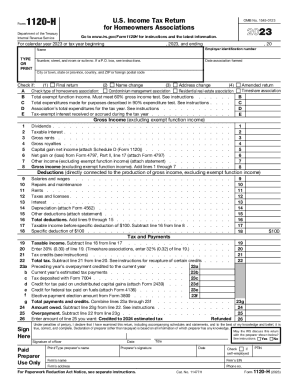
Get Fillable Form 1120-h: For Homeowners Associations Us ...
How it works
-

Open form follow the instructions
-

Easily sign the form with your finger
-

Send filled & signed form or save
How to use or fill out the Fillable Form 1120-H: For Homeowners Associations US online
Filling out the Fillable Form 1120-H can seem daunting, but with a clear understanding of its sections, you can efficiently complete the form online. This guide provides step-by-step instructions to help homeowners associations fulfill their income tax filing requirements.
Follow the steps to fill out the form accurately and efficiently.
- Click ‘Get Form’ button to obtain the form and open it in your browser.
- Begin by entering the association's name at the top of the form. Next, input the employer identification number (EIN) and the association's address, including the number, street, suite number, and postal code.
- Indicate the date the association was formed and check any applicable boxes, such as for final return or name change.
- Specify the type of homeowners association by checking the appropriate box (e.g., condominium management association, residential real estate association, or timeshare association).
- Complete section B by entering total exempt function income, ensuring it meets the 60% gross income test as described in the instructions.
- Fill in the total expenditures made for purposes required in the 90% expenditure test, and then provide the association’s total expenditures for the tax year.
- List the tax-exempt interest received or accrued during the tax year in section E.
- In the gross income section, provide the figures for each specified source of income, per lines 1 through 7, and calculate the total.
- Enter deductions related to the production of gross income from lines 9 through 15, and calculate total deductions.
- Calculate the taxable income by subtracting total deductions from gross income. Include the specific deduction of $100 in your calculations.
- Complete the tax and payments section by calculating the total tax and listing any credits, prior overpayments, or estimated tax payments.
- Finally, ensure the declaration is signed by an officer of the association and provide the required preparer information if applicable. Review all entries for accuracy.
- After reviewing the form, save your changes, and you can download, print, or share the completed form as needed.
Complete your documents online today to ensure timely and accurate filing.
A corporation that's not an S corporation may use either the calendar year or a fiscal tax year. The corporate tax return is generally due by the 15th day of the fourth month following the end of the corporation's tax year.
Industry-leading security and compliance
US Legal Forms protects your data by complying with industry-specific security standards.
-
In businnes since 199725+ years providing professional legal documents.
-
Accredited businessGuarantees that a business meets BBB accreditation standards in the US and Canada.
-
Secured by BraintreeValidated Level 1 PCI DSS compliant payment gateway that accepts most major credit and debit card brands from across the globe.