Loading
Form preview
  • US Legal Forms
  • Form Library
  • More Forms
  • More Multi-State Forms
  • Servo I Ventilator

Get Servo I Ventilator

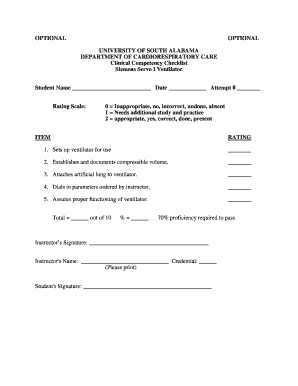
Tempt # Rating Scale: 0 Inappropriate, no, incorrect, undone, absent 1 Needs additional study and practice 2 appropriate, yes, correct, done, present ITEM RATING 1. Sets up ventilator for use 2. Establishes and documents compressible volume. 3. Attaches artificial lung to ventilator. 4. Dials in parameters ordered by instructor. 5. Assures proper functioning of ventilator. Total out of 10 % 70% proficie.

How it works

  1. Open form

    Open form follow the instructions

  2. Easily sign form

    Easily sign the form with your finger

  3. Share form

    Send filled & signed form or save

How to fill out the Servo I Ventilator online

This guide is designed to help users navigate the process of filling out the Servo I Ventilator clinical competency checklist online. With clear, step-by-step instructions, you will understand how to accurately complete each section of the form.

Follow the steps to successfully complete the form.

  1. Press the ‘Get Form’ button to access the clinical competency checklist form, ensuring you have the appropriate document open for editing.
  2. Begin by entering the required information at the top of the form. Fill in your name, date, and attempt number clearly in the designated spaces.
  3. Review the rating scale provided on the form. Familiarize yourself with the ratings from '0' to '2' to effectively assess competencies as you proceed.
  4. Carefully evaluate each item listed under the competency sections. For each competency, assign an appropriate rating based on your assessment of your performance.
  5. Add up the ratings for all items to obtain a total score out of 10. Make sure that the scores accurately reflect your competencies.
  6. Calculate the percentage score by dividing the total score by 10 and multiplying by 100. Ensure this percentage reflects the assessment accurately.
  7. Check the requirement of 70% proficiency needed to pass. Make sure your calculated percentage meets this criterion.
  8. Gather the necessary signatures. Ensure both the instructor and student signatures are clearly written in their respective sections.
  9. Once you have filled out the form completely, save your changes, and consider options to download, print, or share the form as needed.

Complete your forms online today to streamline your documentation process.

Get form

Experience a faster way to fill out and sign forms on the web. Access the most extensive library of templates available.
Get form

Related content

MAQUET - accessdata.fda.gov
Jun 13, 2014 — The ventilator delivers controlled or supported breaths to the patient...
Learn more
hamilton-mode-comparison.pdf
Servo-I /-U. Carestation R860. Esprit/V200. Evita XL. Evita V500. ASV ... Guaranteed...
Learn more
Overdrive Servos (Fallout 4)
Dec 1, 2023 — The Overdrive Servos are a power armor leg mod in Fallout 4. Effects. When...
Learn more

Related links form

Don't Use Form 35E Escalation Addendum To Document The ... Consumer Math Test Pdf Earth And Beyond - First Coast Academy World History And You Book 2 STUDY GUIDE - First Coast Academy

Questions & Answers

Get answers to your most pressing questions about US Legal Forms API.

Contact support

Servo-i features all the modes you would expect from an advanced ventilation system in one adaptable platform. It also presents a wide range of tools to help you stabilize your patient and wean them off the ventilator. Servo-i Mechanical Ventilator - Getinge getinge.com https://.getinge.com › products › servo-i-mechanica... getinge.com https://.getinge.com › products › servo-i-mechanica...

SERVO-i is extremely easy to learn and use. It features a highly intuitive interface with a large touchscreen and simple, logical menus. Push buttons and knobs can also be used for control. The system gives direct access to vital settings such as PEEP, O2 concentration, respiratory rate and volume/pressure.

Servo-i: The first ventilator system designed as an upgradeable mobile and modular platform. Servo-s: A straightforward and cost-effective package utilizing cutting edge technology.

In the SERVO-i model this flow is around 2 litres per minute. In order to trigger the ventilator, the patient needs to deflect some of this bias flow, so that the expiratory flow sensor and the inspiratory flow sensors detect a difference between inspiratory (Vin) and expiratory (Vout) flow rates. Triggering of a mechanically supported breath derangedphysiology.com https://derangedphysiology.com › respiratory-system › tr... derangedphysiology.com https://derangedphysiology.com › respiratory-system › tr...

Since the introduction of the first SERVO ventilator in 1971, MAQUET has delivered more than 100,000 units and SERVO has become the world's number one ventilation brand.

The most common modes of MV include: Volume-limited assist control ventilation (VAC) Pressure-limited assist control ventilation (PAC) Synchronized intermittent mandatory ventilation with pressure support ventilation (SIMV-PSV)

Get This Form Now!

Use professional pre-built templates to fill in and sign documents online faster. Get access to thousands of forms.
Get form
If you believe that this page should be taken down, please follow our DMCA take down processhere.

Industry-leading security and compliance

US Legal Forms protects your data by complying with industry-specific security standards.
  • In businnes since 1997
    25+ years providing professional legal documents.
  • Accredited business
    Guarantees that a business meets BBB accreditation standards in the US and Canada.
  • Secured by Braintree
    Validated Level 1 PCI DSS compliant payment gateway that accepts most major credit and debit card brands from across the globe.
Get Servo I Ventilator
Get form
  • Adoption
  • Bankruptcy
  • Contractors
  • Divorce
  • Home Sales
  • Employment
  • Identity Theft
  • Incorporation
  • Landlord Tenant
  • Living Trust
  • Name Change
  • Personal Planning
  • Small Business
  • Wills & Estates
  • Packages A-Z
  • Affidavits
  • Bankruptcy
  • Bill of Sale
  • Corporate - LLC
  • Divorce
  • Employment
  • Identity Theft
  • Internet Technology
  • Landlord Tenant
  • Living Wills
  • Name Change
  • Power of Attorney
  • Real Estate
  • Small Estates
  • Wills
  • All Forms
  • Forms A-Z
  • Form Library
  • Legal Hub
  • About Us
  • Help Portal
  • Legal Resources
  • Blog
  • Affiliates
  • Contact Us
  • Delete My Account
  • Site Map
  • Industries
  • Forms in Spanish
  • Localized Forms
  • State-specific Forms
  • Forms Kit
  • Real Estate Handbook
  • All Guides
  • Notarize
  • Incorporation services
  • For Consumers
  • For Small Business
  • For Attorneys
  • USLegal
  • FormsPass
  • pdfFiller
  • signNow
  • altaFlow
  • DocHub
  • Instapage
Form Packages
  • Adoption
  • Bankruptcy
  • Contractors
  • Divorce
  • Home Sales
  • Employment
  • Identity Theft
  • Incorporation
  • Landlord Tenant
  • Living Trust
  • Name Change
  • Personal Planning
  • Small Business
  • Wills & Estates
  • Packages A-Z
Form Categories
  • Affidavits
  • Bankruptcy
  • Bill of Sale
  • Corporate - LLC
  • Divorce
  • Employment
  • Identity Theft
  • Internet Technology
  • Landlord Tenant
  • Living Wills
  • Name Change
  • Power of Attorney
  • Real Estate
  • Small Estates
  • Wills
  • All Forms
  • Forms A-Z
  • Form Library
Customer Service
  • Legal Hub
  • About Us
  • Help Portal
  • Legal Resources
  • Blog
  • Affiliates
  • Contact Us
  • Delete My Account
  • Site Map
  • Industries
  • Forms in Spanish
  • Localized Forms
  • State-specific Forms
  • Forms Kit
Legal Guides
  • Real Estate Handbook
  • All Guides
Prepared for you
  • Notarize
  • Incorporation services
Our Customers
  • For Consumers
  • For Small Business
  • For Attorneys
Our Sites
  • USLegal
  • FormsPass
  • pdfFiller
  • signNow
  • altaFlow
  • DocHub
  • Instapage
Social Media
Call us now toll free:
+1 833 426 79 33
As seen in:
© Copyright 1999-2026 airSlate Legal Forms, Inc. 3720 Flowood Dr, Flowood, Mississippi 39232
  • Your Privacy Choices
  • Terms of Service
  • Privacy Notice
  • Content Takedown Policy
  • Bug Bounty Program