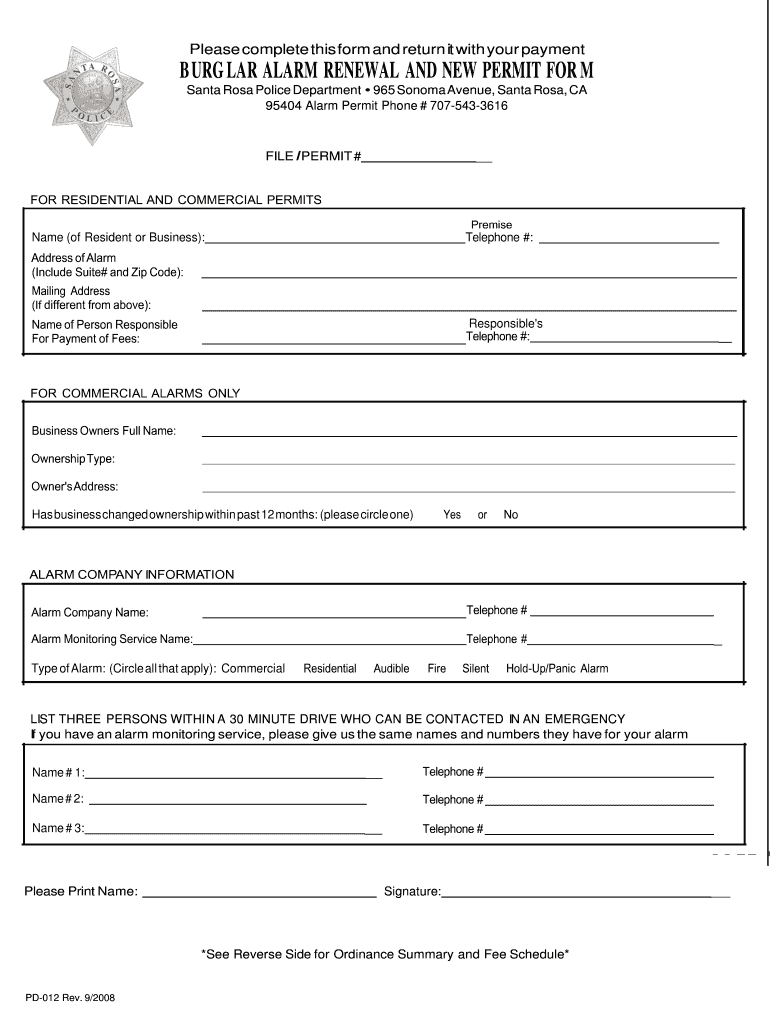
Please complete this form and return it with your payment BURG LAR ALARM RENEWAL AND NEW PERMIT FOR M Santa Rosa Police Department 965 Sonoma Avenue, Santa Rosa, CA 95404 Alarm Permit Phone # 7075433616.

Open form follow the instructions

Easily sign the form with your finger

Send filled & signed form or save
How to fill out the CA PD-012 online
This guide offers a clear and supportive walkthrough for completing the CA PD-012 form online. Follow these instructions to ensure that your application for an alarm permit is accurate and complete.
Follow the steps to successfully fill out the CA PD-012 form.
- Click the ‘Get Form’ button to access the CA PD-012 form and open it in your preferred editor.
- Enter the name of the resident or business in the designated field. Ensure that it is clearly printed for easy readability.
- Provide a valid telephone number where the resident or business can be reached. This is essential for emergency contact purposes.
- Indicate whether the business has changed ownership within the past 12 months. Circle 'yes' or 'no' as applicable.
- Select the type of alarm system in use by circling all relevant options available, such as 'commercial'.
- List three persons who can be contacted in case of an emergency. Include their names and ensure they are within a 30-minute drive of the location.
- Confirm that the names provided for emergency contact are also given to your alarm monitoring service, if applicable.
- Print your name in the final section provided, confirming your identity and responsibility.
- Sign the form to validate your application and affirm that the information provided is accurate.
- Once completed, save your changes, download a copy of the form, and choose to print or share it as needed.
Complete your alarm permit application online today.
Experience a faster way to fill out and sign forms on the web. Access the most extensive library of templates available.
Related content
This index organizes precedent decisions listed in numerical order by category. Note: The...
Researchers want to learn if V940 with pembrolizumab can stop advanced melanoma from...
The. California Department of Toxic Substances Control (DTSC) regulates groundwater...
Get answers to your most pressing questions about US Legal Forms API.
What is the difference between a writ of attachment and a writ of execution?
A writ of attachment and a writ of execution serve different purposes in California law. A writ of attachment allows a creditor to seize a debtor's property before a judgment is entered, while a writ of execution enforces a judgment that has already been obtained. Understanding this distinction is crucial, and resources like CA PD-012 can provide additional guidance on the legal processes involved.
How do you designate a case as complex in California?
To designate a case as complex in California, you should file a motion with the court, outlining the reasons why your case requires this designation. Factors to consider include significant financial interests, multiple parties, or extensive pretrial discovery, all typically addressed in CA PD-012. The court will then review your motion and decide whether to grant the complexity designation.
How do I file a trial by written declaration in California?
To file a trial by written declaration in California, you must follow specific guidelines. Begin by checking your eligibility and obtaining the proper forms, such as those related to CA PD-012. Fill out these forms completely and submit them to the court by the deadline. This allows you to present your case in writing rather than appearing in person, simplifying the process.
How do I file a writ of execution in California?
Filing a writ of execution in California involves several steps. First, make sure you have a valid judgment. You will then complete the required forms, often available through CA PD-012, and submit them to the court along with your payment. Once the court processes your request, you will receive the writ, enabling you to enforce your judgment.
When to file motion to compel discovery?
You should file a motion to compel discovery if the opposing party fails to respond to discovery requests in a reasonable manner. Generally, this motion can be filed after you have made a good faith effort to resolve the issue informally. Timing is critical since delays can impact your case strategy. Utilizing platforms like US Legal Forms can simplify outlining your motion.
When to file motion for attorney fees in California?
In California, you should file a motion for attorney fees typically after a judgment is rendered but before the court closes the case. It's crucial to understand that deadlines may vary based on the specific case type and legal basis for the fees. Timely filing is essential to ensure the court reviews your request. Use tools like US Legal Forms to guide you through the process and ensure compliance.
What happens after a Memorandum of costs is filed?
Once you file a Memorandum of Costs, the court takes notice and provides a chance for the opposing party to contest the claimed expenses. This can lead to a hearing to decide the validity of the costs. Depending on the outcome, you may receive an order to recover your costs or a reduction based on objections raised. Understanding this process is vital for effective recovery of your expenses.
What is the timeline for filing a Memorandum of costs?
In California, the timeline for filing a Memorandum of Costs is usually within 15 days after the clerk has entered judgment. It's important to adhere to this deadline to ensure that you can claim your costs. Failure to file on time may result in losing the opportunity to recover reimbursements. Always check the specific nuances in your case, as timelines can vary.
What is form ej 150?
Form EJ 150 is a document known as a Memorandum of Costs. This form is crucial in California civil cases as it outlines the costs incurred by a party. Filing the EJ 150 allows you to recover various expenses after a judgment is rendered in your favor. Utilizing the form correctly ensures that you get reimbursed for your legal expenditures.
Use professional pre-built templates to fill in and sign documents online faster. Get access to thousands of forms.
If you believe that this page should be taken down, please follow our DMCA take down process here.