Loading
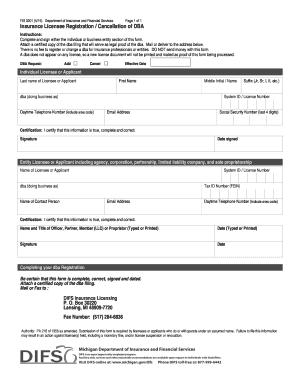
Get Insurance Licensee Registration Cancellation Of Dba
How it works
-

Open form follow the instructions
-

Easily sign the form with your finger
-

Send filled & signed form or save
How to fill out the Insurance Licensee Registration Cancellation Of DBA online
Filling out the Insurance Licensee Registration Cancellation Of DBA online is a straightforward process that allows individuals and entities to cancel their ‘doing business as’ registration. This guide provides step-by-step instructions to ensure you complete the form accurately and efficiently.
Follow the steps to successfully complete your DBA cancellation form.
- Click ‘Get Form’ button to obtain the form and open it in the editor.
- Determine whether you are completing the individual or business entity section of the form. Ensure you select the correct section based on your status.
- In the individual section, fill out your last name, first name, middle initial/name, suffix, system ID/license number, daytime telephone number, email address, and the last four digits of your Social Security number.
- In the business entity section, provide the name of the licensee or applicant, system ID/license number, dba name, tax ID number (FEIN), name of the contact person, email address, and daytime telephone number.
- Indicate whether you wish to add or cancel the dba by selecting the appropriate option in the DBA request section.
- Provide the effective date for the cancellation of your DBA.
- Certify the information provided by signing your name and noting the date signed on the respective lines.
- Attach a certified copy of the dba filing that serves as legal proof of the dba.
- Finalize your process by saving changes, and you may download, print, or share the form as needed.
- Mail or deliver the form along with the attached documentation to the DIFS Insurance Licensing at the specified address.
Start filling out your Insurance Licensee Registration Cancellation Of DBA online today!
After filling out the complete form, you will need to get it notarized before filing it with the respective county clerk, either in person or by mail. The filing fee and payment method can vary depending on the Michigan county. Not including the possible notary charge, the DBA filing fee generally costs about $10-$20.
Industry-leading security and compliance
US Legal Forms protects your data by complying with industry-specific security standards.
-
In businnes since 199725+ years providing professional legal documents.
-
Accredited businessGuarantees that a business meets BBB accreditation standards in the US and Canada.
-
Secured by BraintreeValidated Level 1 PCI DSS compliant payment gateway that accepts most major credit and debit card brands from across the globe.