Loading
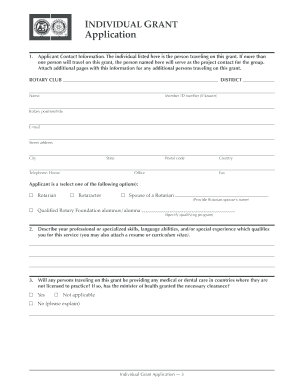
Get The Rotary Foundation Individual Grant Application Instructions
How it works
-

Open form follow the instructions
-

Easily sign the form with your finger
-

Send filled & signed form or save
How to fill out the THE ROTARY FOUNDATION Individual Grant Application Instructions online
This guide provides a comprehensive overview of the steps required to complete the THE ROTARY FOUNDATION Individual Grant Application Instructions online. Designed for ease of use, this guide will help you navigate through each section of the application with confidence.
Follow the steps to efficiently complete your grant application.
- Click ‘Get Form’ button to access the grant application form online.
- Begin by entering the applicant contact information. This includes the name, member ID number (if known), Rotary position/title, email, street address, city, state, postal code, country, and telephone numbers.
- Indicate the applicant's Rotary affiliation by selecting one of the options provided: Rotarian, Rotaractor, spouse of a Rotarian, or qualified Rotary Foundation alumnus/alumna.
- Describe your professional or specialized skills, language abilities, and any relevant experience that qualifies you for the service.
- Provide details on whether any individuals traveling under this grant will be providing medical or dental care without proper licensing, and if necessary, confirm clearance from the minister of health.
- Specify the project location, including the project site name, city, and country.
- Outline the details of the service or planning effort, describing specific activities planned for the trip.
- If applicable, provide the name of any cooperating organization involved in the project and attach the required participation and endorsement letters.
- Complete the proposed length of stay section by indicating the departure date, return date, and number of days (excluding travel days).
- Detail your food and housing arrangements at the project site. Indicate if local Rotarians will provide accommodations.
- Prepare the proposed grant budget by itemizing costs for airfare, food, lodging, and any other relevant expenses.
- Attach necessary travel documents, including the RITS Travel Request Form and any lower estimates if applicable.
- Secure the authorization from the home Rotary club or district by obtaining a signature or letter of endorsement from the appropriate authority.
- If applicable, acquire the host partner Rotary club or district authorization for the project site, ensuring it includes contact and sponsor partner information.
- Sign the application to certify that all provided information is accurate.
- Consider obtaining certification from the district grant subcommittee chair, though it is not required, to enhance the application's completeness.
- Once all information is accurately filled in, finalize your application and save the changes. You may download, print, or share the form as required.
Complete your application online today to support your humanitarian efforts with The Rotary Foundation.
To authorize a global grant application, go to My Actions. Go to the Authorization Required section of the page. You can use Filter to search for a grant by number. Depending on your role (club president, district Rotary Foundation committee chair, or district governor), you'll see various authorization links.
Industry-leading security and compliance
US Legal Forms protects your data by complying with industry-specific security standards.
-
In businnes since 199725+ years providing professional legal documents.
-
Accredited businessGuarantees that a business meets BBB accreditation standards in the US and Canada.
-
Secured by BraintreeValidated Level 1 PCI DSS compliant payment gateway that accepts most major credit and debit card brands from across the globe.