Loading
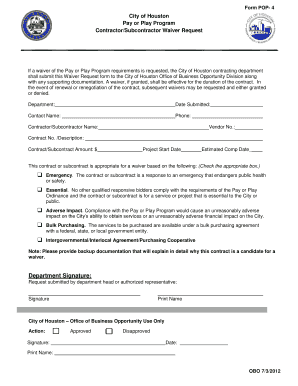
Get City Of Houston Pay Or Play Program Contractor / Subcontractor ...
How it works
-

Open form follow the instructions
-

Easily sign the form with your finger
-

Send filled & signed form or save
How to fill out the City Of Houston Pay Or Play Program Contractor/Subcontractor Waiver Request online
This guide provides clear instructions for completing the City Of Houston Pay Or Play Program Contractor/Subcontractor Waiver Request form online. By following these steps, you can ensure the accurate submission of your waiver request, enhancing clarity and compliance throughout the process.
Follow the steps to successfully complete your waiver request form.
- Click ‘Get Form’ button to access the waiver request form and open it in your preferred online document editor.
- Complete the 'Department' field with the relevant department name associated with the contract or subcontract.
- Fill in the 'Date Submitted' field with the current date of submission.
- Provide the 'Contact Name' of the individual responsible for the waiver request.
- Input the 'Phone' number for the contact person to facilitate communication.
- Enter the 'Contractor/Subcontractor Name' as it appears in official records.
- Include the 'Vendor No.' assigned to the contractor or subcontractor in city records.
- Fill in the 'Contract No. / Description' to specify the contract or project being referenced.
- Indicate the 'Contract/Subcontract Amount' in U.S. dollars.
- Provide the planned 'Project Start Date' for the contract or subcontract.
- Estimate the 'Completion Date' for the project and fill it in appropriately.
- Check the appropriate box to justify the request for a waiver based on the provided categories.
- Ensure to attach backup documentation that explains in detail why the contract warrants a waiver.
- Have the department head or authorized representative sign in the 'Department Signature' section.
- Print the name of the person who is submitting the request in the designated area.
- After completing and verifying all fields, save your changes and take necessary actions like downloading or printing the form.
Complete your waiver request form online today to ensure compliance and facilitate your project needs.
Longevity Pay The City awards $2 per pay period for every complete year of service to full-time permanent employees. Longevity pay appears as a separate item on your pay stub. It increases automatically each year on the first pay period after your employment anniversary date.
Industry-leading security and compliance
US Legal Forms protects your data by complying with industry-specific security standards.
-
In businnes since 199725+ years providing professional legal documents.
-
Accredited businessGuarantees that a business meets BBB accreditation standards in the US and Canada.
-
Secured by BraintreeValidated Level 1 PCI DSS compliant payment gateway that accepts most major credit and debit card brands from across the globe.