Loading
Get Jamaican Passport Application Form 2018-2026
How it works
-

Open form follow the instructions
-

Easily sign the form with your finger
-

Send filled & signed form or save
How to fill out the Jamaican Passport Application Form online
Completing the Jamaican Passport Application Form online is a straightforward process that requires attention to detail and accuracy. This guide will walk you through each step, ensuring you provide all necessary information to obtain your passport.
Follow the steps to successfully complete your passport application online.
- Click ‘Get Form’ button to access the Jamaican Passport Application Form and open it in your chosen document editor.
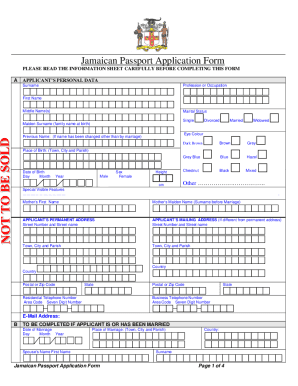
- Provide your personal details in Section A, including your surname, first name, middle name(s), marital status, and eye color. Ensure to fill out the place and date of birth accurately.
- In the same section, specify your height, any special visible features, and details about your mother, including her first name and maiden name.
- Complete your permanent address and mailing address in the respective sections. Make sure both addresses are complete, including street number, name, city, parish, country, and postal code.
- If applicable, fill out Section B regarding your marital history. Provide the date and place of marriage along with your spouse's name.
- For individuals under the age of 18, complete Section C for consent. Fill in details for the consent-giver, including their name, relationship, and signature to authorize the application.
- In Section D, provide particulars of your most recent passport. Include the passport number, date of issue, date of loss (if relevant), and circumstances if the passport has been damaged.
- Proceed to Section E to make a declaration verifying the accuracy of the information provided and your eligibility for a passport. Remember to date and sign this declaration.
- Fill out the emergency contact information in Section F for two individuals. Note their names, addresses, phone numbers, and relationships to you.
- Complete the necessary certifications in Section G, ensuring that all sections A-F are correctly filled before the certifying official signs and stamps the form.
- If required, complete additional sections for applicants wearing headgear for religious purposes and those born outside Jamaica.
- Finally, review all sections for completeness. Save your changes, download the completed form, and prepare to print or share it as instructed.
Start your passport application process online today and ensure you have all the needed documents ready.