Loading
Get Nyc Buildings Lic38 2023-2026
How it works
-

Open form follow the instructions
-

Easily sign the form with your finger
-

Send filled & signed form or save
How to fill out the NYC Buildings LIC38 online
This guide provides a detailed overview of how to complete the NYC Buildings LIC38 Electrical License Application online. Follow these steps to ensure a smooth application process.
Follow the steps to complete the application efficiently.
- Click ‘Get Form’ button to obtain the LIC38 form and open it in your preferred editor.
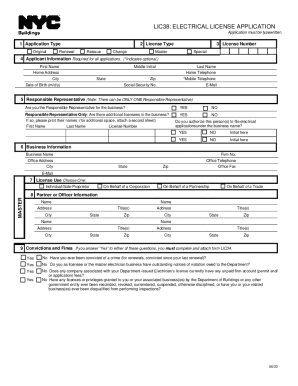
- Select the application type. Choose 'Original' for a new application or 'Renewal' if you are renewing an existing license.
- Indicate the license type. Select 'Reissue' if you need a replacement or 'Change' for any modifications.
- Enter your license number if applicable, and choose your license category as either 'Master' or 'Special'.
- Fill out the applicant information section, including your first name, middle initial, last name, home address, city, state, ZIP code, home telephone number, date of birth, social security number, and email address. Note that mobile telephone is optional.
- Designate the Responsible Representative. Confirm if you are the Responsible Representative for the business, noting that there can be only one. If there are other licensees, list their names and license numbers.
- Provide business information including business name, firm number, office address, office telephone, city, state, ZIP code, office fax, and email.
- Select the license use option that suits your situation: Individual/Sole-Proprietor, On Behalf of a Corporation, On Behalf of a Partnership, or On Behalf of a Trade Master.
- Complete the Partner or Officer Information section by providing the names, addresses, and titles of any partners or officers involved with the business.
- Answer questions regarding convictions and fines. If you answer 'Yes' to any of them, you must complete and attach form LIC34.
- Review the Applicant Statements and Signatures section. Print your name, sign, and date the application. Include the Electrician’s Seal if required.
- For notarization, fill in the necessary information and obtain a notary’s signature and seal.
- Finally, ensure all sections are completed. Save your changes, download, print, or share the form as needed.
Complete your NYC Buildings LIC38 application online today.