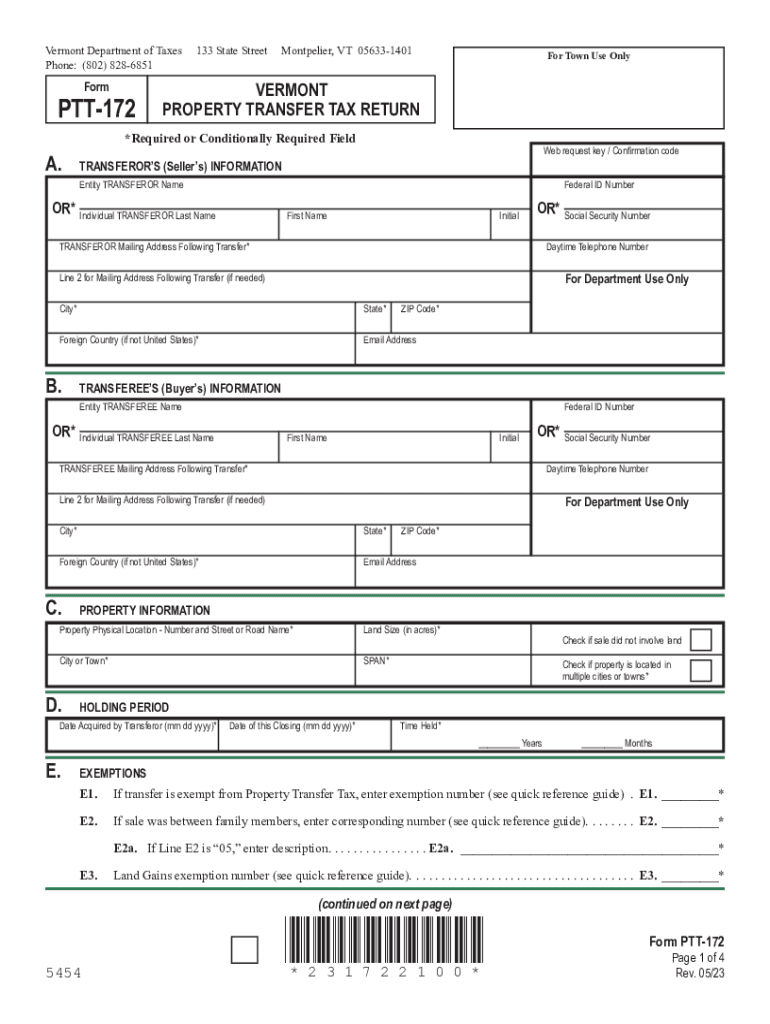
Required Field A. Web request key / Confirmation code TRANSFEROR S (Seller s) INFORMATION Entity TRANSFEROR Name OR* Individual TRANSFEROR Last Name Federal ID Number First Name Initial OR* Social Security Number TRANSFEROR Mailing Address Following Transfer* Daytime Telephone Number For Department Use Only Line 2 for Mailing Address Following Transfer (if needed) City* State* Foreign Country (if not United States)* Email Address B. ZIP Code* TRANSFEREE S.

Open form follow the instructions

Easily sign the form with your finger

Send filled & signed form or save
How to fill out the Taxable Calculation online
Filling out the Taxable Calculation form is an essential step in reporting property transfer tax information. This guide provides clear and detailed steps to help users navigate the form efficiently and accurately.
Follow the steps to successfully complete your Taxable Calculation form.
- Click ‘Get Form’ button to obtain the form and open it in the editor.
- Begin by inputting the web request key or confirmation code if available, then proceed to the section for the transferor's (seller's) information. Fill in the entity or individual transferor's name, federal ID number or social security number, and the mailing address following the transfer.
- Next, provide the transferee's (buyer's) information in a similar manner as the transferor, including their mailing address and contact details.
- In the property information section, enter the physical location of the property, land size in acres, city or town, and the SPAN if applicable. Mark whether the sale did not involve land or if the property is located in multiple cities or towns.
- Fill in the holding period details including the date the transferor acquired the property, the date of the closing, and time held in years and months.
- For exemptions, enter any applicable exemption numbers and descriptions as specified, particularly for transfers between family members if applicable.
- Complete the transfer information section by providing details on how the transferor acquired the property, the interest conveyed, and answers to any relevant questions regarding building construction.
- Answer questions in the agricultural/managed forest land use value program section to confirm if the property is enrolled in the Current Use Program.
- Proceed to the real estate withholding certification, ensuring to indicate if the Vermont income tax has been withheld and provide any necessary exemption numbers.
- Lastly, complete the tax calculation section by entering values as required and calculating the total tax due based on the portions eligible for special rates and the general rate.
- Once all sections are completed, review your information for accuracy. You can then save changes, download, print, or share the form as needed.
Complete your Taxable Calculation form online today to ensure timely submission.
Experience a faster way to fill out and sign forms on the web. Access the most extensive library of templates available.
Related content
Nov 16, 2023 — Use this tool to: Estimate your federal income tax withholding; See how...
Nov 16, 2023 — Use this tool to estimate the federal income tax you want your employer...
Car tax calculator - Calculate the tax amount for your car with just a few entries...
Get answers to your most pressing questions about US Legal Forms API.
What is the formula to calculate tax?
When written out, the equation looks like this: Sales tax rate = Sales tax percent / 100. Sales tax = List price x Sales tax rate.
What is the formula for taxable amount?
All the eligible deductions, allowance and reliefs are calculated on each heads. Total Tax Payable= Tax on Total Income- Rebates and relief allowed under Income Tax Act. How to Calculate Taxable Income on Salary? - BankBazaar bankbazaar.com https://.bankbazaar.com › tax › how-calculate-taxab... bankbazaar.com https://.bankbazaar.com › tax › how-calculate-taxab...
How do I add 8.25 tax to a price?
How to Calculate Sales Tax Find list price and tax percentage. Divide tax percentage by 100 to get tax rate as a decimal. Multiply list price by decimal tax rate to get tax amount. Add tax amount to list price to get total price. Sales Tax Calculator Calculator Soup https://.calculatorsoup.com › Financial › Sales Calculator Soup https://.calculatorsoup.com › Financial › Sales
What is the formula to calculate the amount of tax?
Sales Tax Calculation and Formula Know the retail price and the sales tax percentage. Divide the sales tax percentage by 100 to get a decimal. Multiply the retail price by the decimal to calculate the sales tax amount. How to Calculate Sales Tax - Investopedia Investopedia https://.investopedia.com › ... › Taxes Investopedia https://.investopedia.com › ... › Taxes
How is taxable amount calculated?
By subtracting all the eligible deductions from the gross taxable income, you will arrive at your total income on which you need to pay tax basis your tax slab. This slab rate is different for senior citizens. For those who are over 60 years old with up to Rs 3 lakh net income, the tax rate is nil.
How do you calculate 6% sales tax?
Calculating sales tax on a product or service is straightforward: Simply multiply the cost of the product or service by the tax rate. For example, if you operate your business in a state with a 6% sales tax and you sell chairs for $100 each, you would multiply $100 by 6%, which equals $6, the total amount of sales tax. How to Add 6 Percent Sales Tax - Small Business - Chron.com chron.com https://smallbusiness.chron.com › add-6-percent-sales-tax... chron.com https://smallbusiness.chron.com › add-6-percent-sales-tax...
How can calculate taxable value?
About Finology GST Calculator WHAT IS GST. ... HOW TO CALCULATE GST? ... For this purpose, let us take an Example: ... Outward Supply: Mr. ... Reverse Calculation of GST from Invoice Value. ... [100 X (Tax Rate/ 100+Tax Rate)] i.e., GST= [100 x (18/118)] = Rs. ... Taxable Value i.e., value exclusive of GST = Rs.100 - Rs.15.254 =Rs.84.745.
How do you calculate taxable money?
For individual filers, calculating federal taxable income starts by taking all income minus “above the line” deductions and exemptions, like certain retirement plan contributions, higher education expenses and student loan interest, and alimony payments, among others.
Use professional pre-built templates to fill in and sign documents online faster. Get access to thousands of forms.
If you believe that this page should be taken down, please follow our DMCA take down process here.