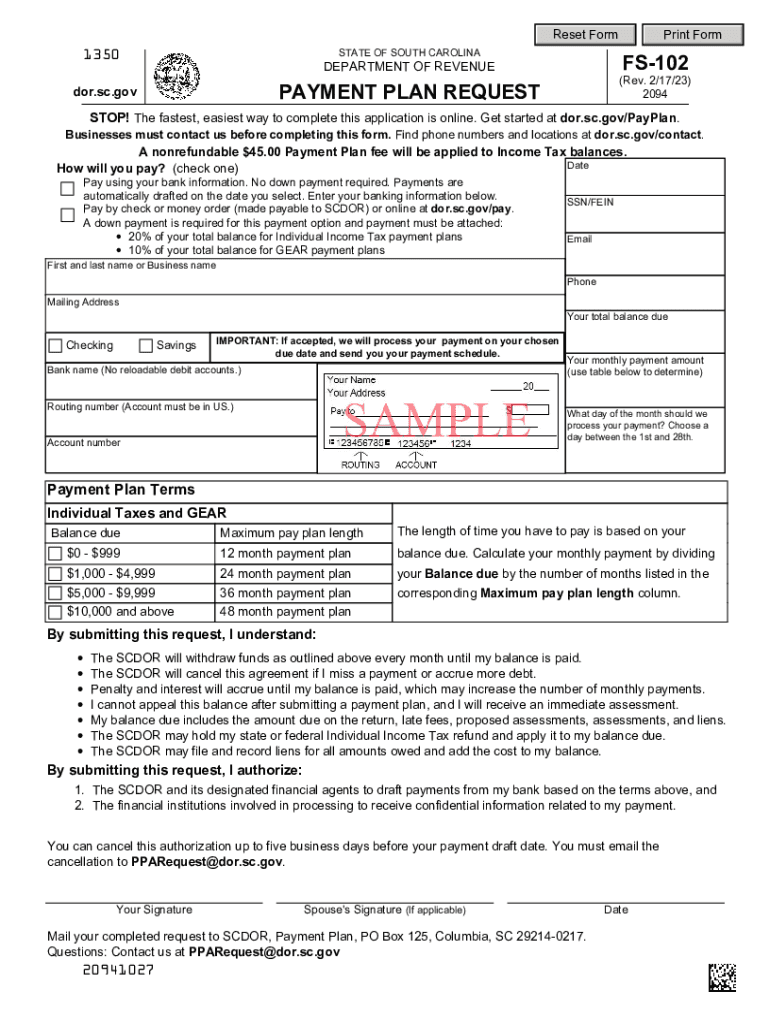
R, Payment Plan, PO Box 125, Columbia, SC 29214-0217. Questions: Contact us at PPARequest dor.sc.gov 20941027 Date.
Loading

Open form follow the instructions

Easily sign the form with your finger

Send filled & signed form or save
How to fill out the South Carolina Fs online
Filling out the South Carolina Fs, specifically the payment plan request form, can be straightforward if you follow a structured approach. This guide will walk you through each section of the form, ensuring you understand what information is required and how to complete it properly.
Follow the steps to accurately complete the online payment plan request form.
- Click ‘Get Form’ button to obtain the form and open it for editing.
- Enter the date in the designated field at the top of the form. This serves as a reference for your application submission.
- Indicate your payment method by selecting one of the options provided. You can choose to pay using your bank information with no down payment or opt to pay by check or money order, which requires an attached down payment.
- If choosing the bank payment option, fill in your banking information including the bank name, routing number, and account number. Ensure the account is not a reloadable debit account.
- For the payment by check or money order option, specify the required down payment amount based on the calculation of your total balance due.
- Complete your personal information, including your Social Security Number (SSN) or Federal Employer Identification Number (FEIN), email address, first and last name or business name, phone number, mailing address, and your total balance due.
- Determine your monthly payment amount using the table provided to calculate based on your balance due. Fill in the amount in the designated field.
- Select the day of the month when you would like your payment to be processed. You can choose a day between the 1st and the 28th.
- Read and understand the payment plan terms outlined in the form, including conditions for missed payments and cancellation of the plan.
- Review all information for accuracy before signing. Sign the form and include your spouse's signature if applicable.
- Finalize your request by saving the changes made to the form. You can choose to download, print, or share the completed form as needed.
Complete your South Carolina Fs payment plan request online today to streamline the process.
Experience a faster way to fill out and sign forms on the web. Access the most extensive library of templates available.
Related content
Mail your completed request to SCDOR, Payment Plan, Columbia, SC 29214-0217. Questions:...
Please review the terms, conditions, eligibility requirements and restrictions, which can...
by LA DeSimone · Cited by 213 — South Carolina. Multiple counties (21). NO3, VOCs...
Get answers to your most pressing questions about US Legal Forms API.
What is South Carolina state income tax rate 2023?
Like the federal income tax, the South Carolina state income tax is progressive, meaning the rate of taxation increases as taxable income increases. In 2023, the South Carolina state income tax rates range from 0% to 6.5%.
What is not taxed in South Carolina?
Tax-exempt goods Examples include most non-prepared food items, prescription drugs, and medical supplies. We recommend businesses review the laws and rules put forth by the South Carolina Department of Revenue to stay up to date on which goods are taxable and which are exempt, and under what conditions.
At what age do seniors stop paying property taxes in South Carolina?
65 years of age, or. declared totally and permanently disabled by a state or federal agency having the authority to make such a declaration, or. legally blind as certified by a licensed ophthalmologist.
Is South Carolina friendly to retirees?
South Carolina is tax-friendly toward retirees. Social Security income is not taxed. Withdrawals from retirement accounts are partially taxed. Wages are taxed at normal rates, and your marginal state tax rate is 4.00%.
What is South Carolina state income tax?
Individual Income Tax rates range from 0% to a top rate of 7% on taxable income for tax years 2021 and prior and from 0% to a top rate of 6.5% on taxable income for tax year 2022.
What is qualified retirement income in SC?
Qualified retirement income includes: 401, 403, 408, 457. Public Employee Retirement Plans of Federal, State and local governments. Individual retirement plans. Keogh Plans.
What pensions are not taxable in SC?
South Carolina does not tax Social Security retirement benefits. It also provides a $15,000 taxable income deduction for seniors receiving any other type of retirement income. The state has some of the lowest property taxes in the country.
What retirement income is not taxable in South Carolina?
Social Security retirement benefits are not taxed in South Carolina. Additionally, retirement income from other sources benefits from a $15,000 taxable income deduction.
Use professional pre-built templates to fill in and sign documents online faster. Get access to thousands of forms.
If you believe that this page should be taken down, please follow our DMCA take down process here.