And upload using MyDORWAY! Manage your tax accounts online for FREE! Fast. Easy. Secure. One-stop shop! Manage your tax accounts all in one place Review your payment history Immediate access to correspondence Easily update your account information View your past returns and application submissions + more! Why MyDORWAY? 24/7 account access Make ACH debit or credit card payments with no convenience fees Receive immediate confirmation for transactions Automatic.
Loading

Open form follow the instructions

Easily sign the form with your finger

Send filled & signed form or save
How to fill out the Scwithholding Sc Withholding online
Filling out the Scwithholding Sc Withholding form online can simplify the process of reporting and managing your withholding tax. This guide provides step-by-step instructions to help you navigate the filling out of this important tax document with ease.
Follow the steps to complete your Scwithholding Sc Withholding form accurately.
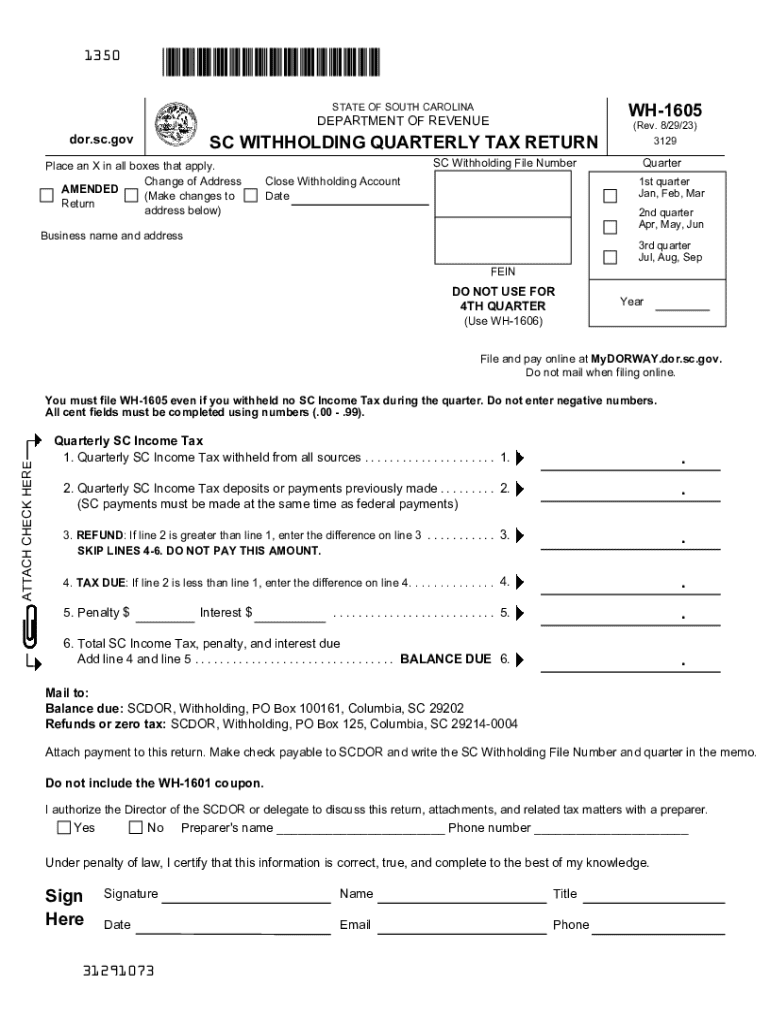
- Click the ‘Get Form’ button to obtain the Scwithholding Sc Withholding form and open it for editing.
- Identify the quarter for which you are filing. Mark the appropriate box to indicate if it is the 1st, 2nd, or 3rd quarter. Remember not to use this form for the 4th quarter as it requires the WH-1606 form.
- Enter your SC Withholding File Number in the designated field. If your address has changed, mark the ‘Change of Address’ box.
- Fill out the business name and address accurately, ensuring all details are current.
- Complete Line 1 by entering the total amount of SC Income Tax withheld from all sources during the quarter. This is a required field and should reflect all withholdings correctly.
- On Line 2, input any quarterly SC Income Tax deposits or payments that you have already made. If this is an amended return, include the amount paid with your original submission.
- If Line 2 exceeds Line 1, calculate the difference and enter it on Line 3 for a refund. If Line 1 is greater than Line 2, skip this line and proceed to Line 4.
- If applicable, enter the amount due on Line 4, which represents the difference between Line 1 and Line 2.
- If there are any penalties due, enter this information on Line 5. For calculations regarding penalties and interest, refer to the resources available online.
- On Line 6, calculate the total amount due by summing the figures from Lines 4 and 5.
- Authorize the Director of the SCDOR or delegate to discuss your return by checking the appropriate box and providing the preparer’s name and phone number, if applicable.
- Sign the form where indicated, ensuring the signature is from a person authorized to act on behalf of the withholding agent.
- After completing the form, review all information for accuracy. Then save the form, download it, print it, or share it as needed.
Complete your Scwithholding Sc Withholding form online for a quick and efficient tax filing experience.
Experience a faster way to fill out and sign forms on the web. Access the most extensive library of templates available.
Related content
Payments are due quarterly if the total Withholding amount is less than $500/quarter, and...
Payments are due quarterly if the total Withholding amount is less than $500/quarter, and...
You must file WH-1605 even if you withheld no SC Income Tax during the quarter. ... SC...
Get answers to your most pressing questions about US Legal Forms API.
What is the nonresident withholding rate in SC?
7% of the total of each payment made to a nonresident taxpayer who is not a corporation. 5% of the total of each payment made to a nonresident taxpayer that is a corporation.
What is SC withholding tax?
Withholding Tax is taken out of taxpayer wages to go towards the taxpayers' total yearly Income Tax liability.
What is the SC S Corp withholding?
S Corporations are required to withhold 5% of the South Carolina taxable income of shareholders who are nonresidents of South Carolina. To avoid penalty and interest, file the SC1120S-WH and submit your Withholding Tax payment by the 15th day of the third month following the S Corporation's taxable year end.
How do I find my SC withholding number?
South Carolina Withholding File Number You can find your Withholding File Number on any notices you've received from the SC Department of Revenue. If you're unable to locate this, contact the agency at (844) 898-8542, option 4 .
What is the federal withholding for non residents?
Most types of U.S. source income received by a foreign person are subject to U.S. tax of 30%. A reduced rate, including exemption, may apply if an Internal Revenue Code Section provides for a lower rate, or there is a tax treaty between the foreign person's country of residence and the United States.
What is the withholding for a non resident seller in South Carolina?
The withholding amount is 7% of the amount realized on the sale by a nonresident individual, partnership, trust, or estate, or 5% of the amount realized on the sale by a nonresident corporation or any other nonresident entity, if the seller does not provide the buyer with a Seller's Affidavit stating the amount of gain ...
What is the withholding for nonresident shareholders in South Carolina?
What are the withholding requirements on nonresident partners? Partnerships are required to withhold 5% of the South Carolina taxable income of partners who are nonresidents of South Carolina.
Use professional pre-built templates to fill in and sign documents online faster. Get access to thousands of forms.
If you believe that this page should be taken down, please follow our DMCA take down process here.