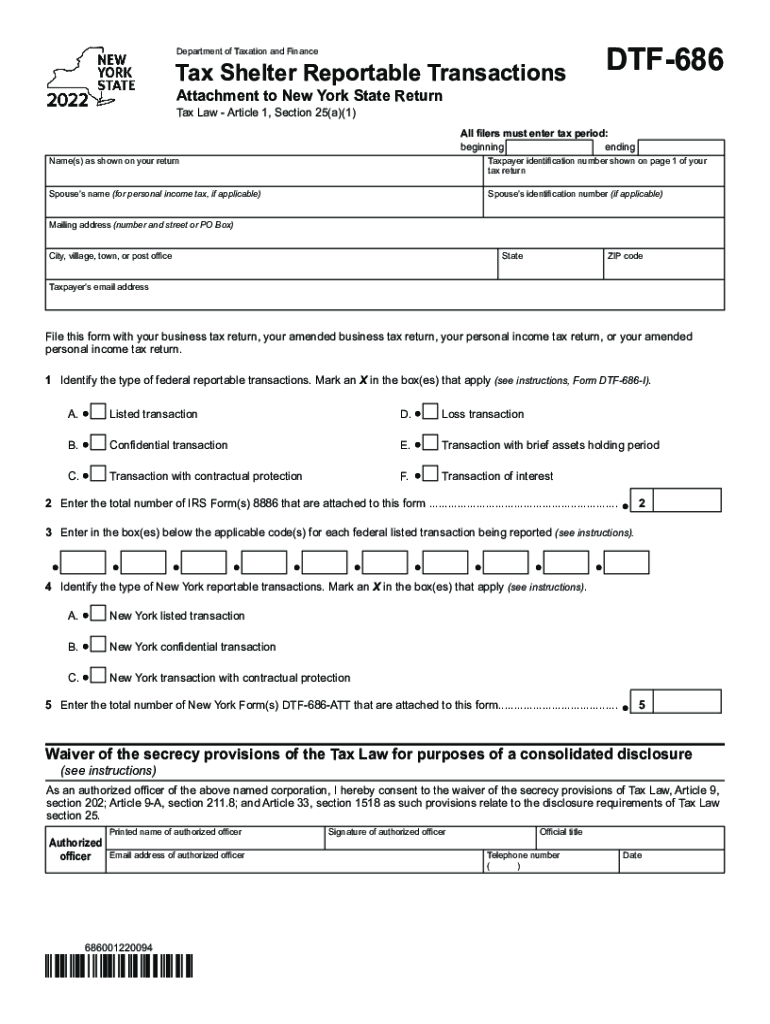
Department of Taxation and FinanceTax Shelter Reportable TransactionsDTF686Attachment to New York State Return Tax Law Article 1, Section 25(a)(1)All filers must enter tax period: beginningendingName(s).
Loading

Open form follow the instructions

Easily sign the form with your finger

Send filled & signed form or save
How to fill out the Instructions For Form DTF-686-ATT - Tax.NY.gov online
Filling out the Instructions For Form DTF-686-ATT is essential for reporting specific tax shelter transactions. This guide provides clear, step-by-step instructions to help users complete the form online effectively.
Follow the steps to complete your form accurately.
- Click the ‘Get Form’ button to access the form and open it in your preferred editor.
- Begin by entering the tax period start and end dates as required at the top of the form.
- Provide your name(s) as they appear on your tax return and include your taxpayer identification number as shown on page 1 of your tax return.
- If applicable, enter your spouse’s name and identification number for personal income tax.
- Fill in your mailing address including the number and street or PO Box, city or village, state, and ZIP code.
- Enter your email address in the designated box for future correspondence.
- Specify the type of federal reportable transactions by marking an X in the appropriate box or boxes.
- Indicate the total number of IRS Form(s) 8886 that you are attaching, as mentioned on the form.
- Provide the applicable code(s) for each federal listed transaction that you are reporting.
- Identify the type of New York reportable transactions by marking an X in the relevant box or boxes.
- Indicate the total number of New York Form(s) DTF-686-ATT that you are attaching.
- Consent to the waiver of the secrecy provisions by signing where indicated and providing the name, email address, title, and telephone number of the authorized officer.
- After completing the form, ensure to save your changes, and you may choose to download, print, or share the form as needed.
Take action now to complete your document online.
Experience a faster way to fill out and sign forms on the web. Access the most extensive library of templates available.
Related content
For tax years beginning on or after January 1, 2006, you must complete and attach Form...
Mark your choice at line 78: • Direct deposit is still the easiest, fastest way to get...
IT-203-D claim the New York itemized deduction. IT-1099-R report NYS, NYC, or Yonkers tax...
Get answers to your most pressing questions about US Legal Forms API.
What is a charitable remainder annuity trust listed transaction?
A charitable remainder annuity trust (CRAT) is a type of gift transaction in which a donor contributes assets to a charitable trust that then pays a fixed income to a designated noncharitable beneficiary.
What number do I call to talk to someone at the IRS?
Contact an IRS customer service representative to correct any agency errors by calling 800-829-1040 (see telephone assistance for hours of operation). Unfortunately, this may result in you receiving a paper check.
Who can I call about my NY state tax refund?
Checking on your refund Once you have filed your return and know you are due a refund, you can: Check your refund status online at any time: by phone at 518-457-5149 (Para español, oprima el dos.)
How do I speak to a live person at NYS tax Department?
518-457-5149—Para español, oprima el dos. 8:30 a.m. – 4:30 p.m.
What are listed transactions on Form 8886?
A listed transaction is a transaction that is the same as or substantially similar to one of the types of transactions that the IRS has determined to be a tax avoidance transaction. These transactions are identified by notice, regulation, or other form of published guidance as a listed transaction.
What are listed transactions?
A "listed transaction" is a transaction that is the same as or substantially similar to one that the IRS has determined to be a tax avoidance transaction and identified by IRS notice or other form of published guidance.
How can I speak to someone at NYS tax department?
Businesses call (518) 485-0384. Individuals call (518) 485-9791. Most Tax Department forms and instructions are available on our Web site. your form by tax type or form number.
What are the 5 types of reportable transactions?
There are five categories of reportable transactions; confidential transactions, transactions with contractual protection, loss transactions, transactions of interest and listed transactions. See the brief descriptions of each type of transaction below.
What is the DTF 686 ATT form?
To request a determination from the Tax Department that a specific transaction, or type of transaction, is, or is not, subject to the reporting requirement, complete Form DTF-686-ATT (see Request for determination).
Can I track my NY state tax refund?
After submitting a completed return, taxpayers can also quickly view the status of their New York State tax refund anytime by using the Check your Refund application on the Tax Department website: .tax.ny.gov. It's the fastest and most convenient way to know when to expect your refund.
Use professional pre-built templates to fill in and sign documents online faster. Get access to thousands of forms.
If you believe that this page should be taken down, please follow our DMCA take down process here.