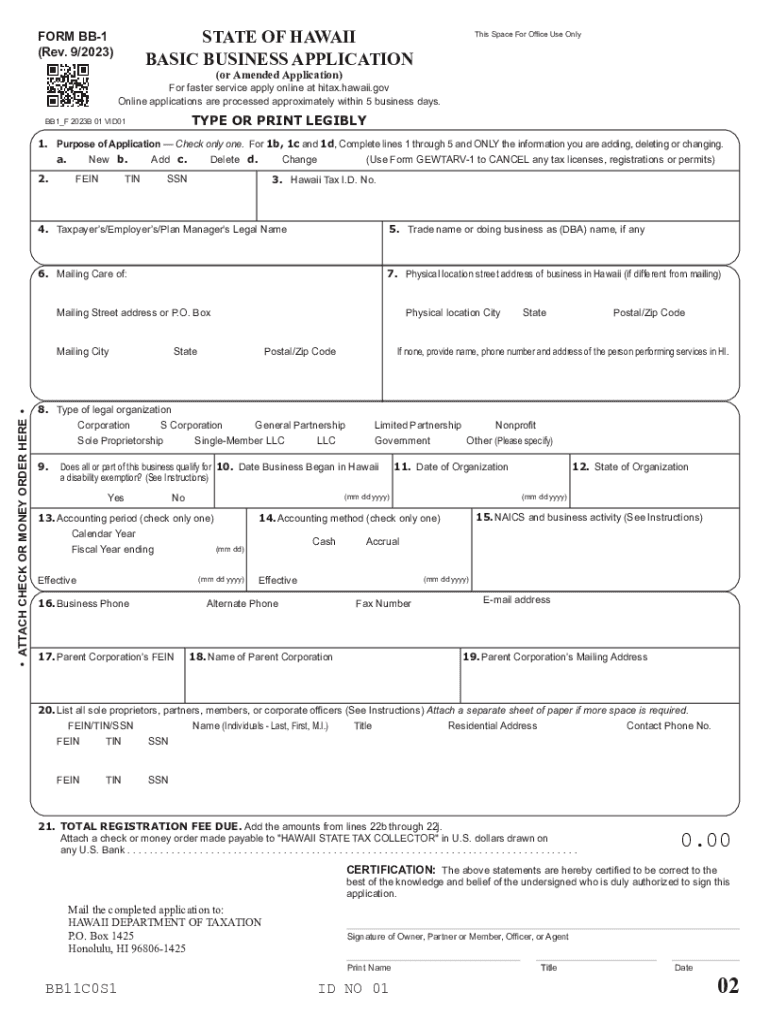
Applications are processed approximately within 5 business days. TYPE OR PRINT LEGIBLY BB1 F 2023B 01 VID01 1. Purpose of Application Check only one. For 1b, 1c and 1d, Complete lines 1 through 5 and ONLY the information you are adding, deleting or changing. a. New b. Add c. Delete d. Change (Use Form GEWTARV-1 to CANCEL any tax licenses, registrations or permits) ATTACH CHECK OR MONEY ORDER HERE 2. FEIN TIN SSN 3. Hawaii Tax I.D. No. 4. Taxpayer s/Empl.

Open form follow the instructions

Easily sign the form with your finger

Send filled & signed form or save
How to fill out the HI DoT BB-1 online
Completing the HI DoT BB-1 form is an essential step for registering various tax licenses and permits in Hawaii. This guide will help you navigate the process clearly and effectively.
Follow the steps to complete the HI DoT BB-1 form online.
- Press the ‘Get Form’ button to access the HI DoT BB-1 form and open it for editing.
- Identify the purpose of your application by checking only one box in section 1, indicating whether you are applying for a new registration, adding to, changing, or deleting existing information.
- In section 2, enter your Federal Employer Identification Number (FEIN), Tax Identification Number (TIN), or Social Security Number (SSN). Ensure you comply with the requirements specific to your business structure.
- For section 3, if this is a new application, leave this field blank. If you are making changes to an existing application, fill in your Hawaii Tax I.D. Number.
- Provide your legal name in section 4. This name should match what appears on your tax return.
- If applicable, enter your trade name or doing business as (DBA) name in section 5.
- Complete section 6 with your mailing address, ensuring it is accurate for future correspondence.
- In section 7, enter the physical location street address of your business in Hawaii, if it differs from your mailing address.
- Specify your type of legal organization in section 8 by checking the appropriate box.
- Address section 9 by indicating whether any part of your business qualifies for a disability exemption, if relevant.
- Fill in section 10 with the date business began in Hawaii.
- In section 11, provide the date of organization.
- Select the appropriate accounting period in section 13, checking only one box.
- Determine your accounting method in section 14 by checking either cash or accrual.
- List your North American Industry Classification System (NAICS) code and business activity in section 15.
- Provide the parent corporation’s details in sections 17 and 18 if applicable.
- List sole proprietors, partners, members, or corporate officers in section 20. If more space is needed, attach a separate sheet.
- Calculate the total registration fee due in section 21 and attach the required payment.
- Complete any remaining information in section 22 based on the tax types being registered.
- Finally, review the form for accuracy, and once completed, save, download, or print it for submission.
Take the first step towards compliance by filling out your HI DoT BB-1 form online now.
Experience a faster way to fill out and sign forms on the web. Access the most extensive library of templates available.
Related content
Nov 6, 2023 — BB-1 Packet, State of Hawaii Basic Business Application, Instructions and...
File it electronically online using hawaiʻi tax online. 2021 Form HI DoT BB1 ... w-4v...
BB! Balcony break. CH: Counter hit; CL: Clean hit; (): Whiffed or blocked moves; (x...
Get answers to your most pressing questions about US Legal Forms API.
How do I get a tax ID number in Hawaii?
If you file Form BB-1 by mail or drop-off, you will receive your HI Tax ID in approximately 4-6 weeks. To apply in person, bring two copies of your completed application and the $20 registration fee to any DOTAX district office.
How do I get a Hawaii withholding account number?
Hawaii Withholding Account Number If you are a new business, register online as a new business through the Hawaii Department of Taxation. If you already have a Hawaii Withholding Account Number, you can look this up online or on any previous correspondence from the Hawaii Department of Taxation.
What is a Hawaii tax ID number?
This is your license or registration number for your General Excise/Use and County Surcharge Tax (GE) account. This ID number should not be associated with other types of tax accounts with the state of Hawaii, such as income tax.
What number do I put for tax withholding?
By placing a “0” on line 5, you are indicating that you want the most amount of tax taken out of your pay each pay period. If you wish to claim 1 for yourself instead, then less tax is taken out of your pay each pay period. 2. You can choose to have no taxes taken out of your tax and claim Exemption (see Example 2).
How do I get a Hawaii withholding tax number?
Use Form BB-1 (found by clicking Register New Business License under Registration) to request a withholding (WH) account number. You may also add a withholding account on Hawaii Tax Online if you already have a login.
How often do you pay Hawaii GE tax?
Filing frequency requirements depend on how much tax you have to pay, or expect to have to pay in a year. If you pay more than $4,000 total in Hawaii GE Tax during the year, you are required to file on a monthly basis. If you pay less than $4,000 in GE Taxes during the year you file on a quarterly basis.
Who must pay Hawaii general excise tax?
The GET is a privilege tax imposed on business activity in the State of Hawaii. The tax is imposed on the gross income received by the person en- gaging in the business activity. The GET applies to nearly every form of business activity.
How do I set up tax withholding?
Complete a new Form W-4, Employee's Withholding Allowance Certificate, and submit it to your employer. Complete a new Form W-4P, Withholding Certificate for Pension or Annuity Payments, and submit it to your payer. Make an additional or estimated tax payment to the IRS before the end of the year.
Use professional pre-built templates to fill in and sign documents online faster. Get access to thousands of forms.
If you believe that this page should be taken down, please follow our DMCA take down process here.