Loading
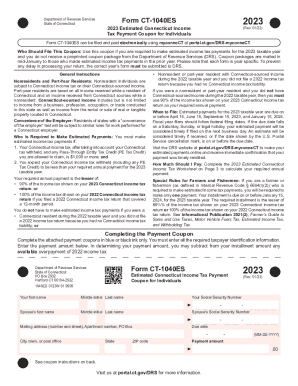
Get Form Ct-1040es Form Ct-1040es
How it works
-

Open form follow the instructions
-

Easily sign the form with your finger
-

Send filled & signed form or save
How to fill out the Form CT-1040ES online
Filling out Form CT-1040ES online is a straightforward process that requires attention to specific details to ensure accurate reporting of estimated income tax payments. This guide provides step-by-step instructions for users of all experience levels to navigate the form effectively.
Follow the steps to complete your Form CT-1040ES online.
- Click ‘Get Form’ button to access the form and open it in your editor.
- Provide your first name, middle initial, and last name as requested on the form. If applicable, include your partner’s information.
- Enter your Social Security Number (SSN) and, if married filing jointly, your partner’s SSN.
- Input your mailing address, including street number, apartment number (if any), and ZIP code.
- Enter the due date for your estimated payment, using the specified format (MM-DD-YYYY).
- Calculate the payment amount based on the provided Estimated Connecticut Income Tax Worksheet and input the total. If you have any overpayment from the previous year, consider subtracting this amount from your installment.
- Review all entered information for accuracy. Make corrections if necessary.
- Once all information is confirmed as correct, you can save your changes, download, print, or share the completed Form CT-1040ES as needed.
Start filling out your Form CT-1040ES online today to meet your estimated payment requirements.
Related links form
Purpose: Use Form CT-1040 EXT to request a six-month extension to file your Connecticut income tax return for individuals.