Loading
Get Planned Absence Form - North Olmsted City Schools
How it works
-

Open form follow the instructions
-

Easily sign the form with your finger
-

Send filled & signed form or save
How to fill out the Planned Absence Form - North Olmsted City Schools online
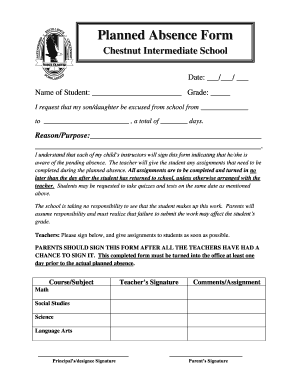
Filling out the Planned Absence Form for North Olmsted City Schools is an important step in notifying the school of a student's upcoming absence. This guide provides clear, step-by-step instructions to help you complete the form accurately and efficiently.
Follow the steps to successfully complete the Planned Absence Form.
- Click the ‘Get Form’ button to access the Planned Absence Form. This will open the form in the online editor.
- Enter the date of the absence in the format ___/___/ ___. Ensure you fill in the appropriate boxes.
- Provide the name of the student in the designated space. Include their first and last name as requested.
- Indicate the student's grade by entering it in the relevant section.
- Specify the dates for the planned absence by filling in the start and end dates of the absence period.
- Detail the reason or purpose for the absence in the provided space. Be clear to ensure proper understanding.
- Review the statement regarding the responsibilities of the teachers and parents. Ensure you comprehend the expectations outlined.
- Sign the form as the parent or guardian. This signature should be completed after all the teachers have signed their respective sections.
- Ensure that each teacher, including their signatures and comments about assignments, is recorded accurately.
- After completing the form, you can save it, download a copy, print it for submission, or share it as required. Make sure to submit the form to the office at least one day prior to the absence.
Complete the Planned Absence Form online today to ensure your child is properly excused from school.
David Brand - Superintendent - NORTH OLMSTED CITY SCHOOL DISTRICT | LinkedIn.