Loading
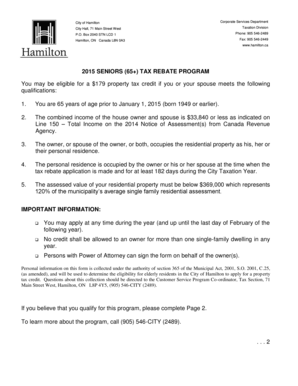
Get City Of Hamilton Letterhead - Sample 1 - Hamilton
How it works
-

Open form follow the instructions
-

Easily sign the form with your finger
-

Send filled & signed form or save
How to use or fill out the City of Hamilton Letterhead - Sample 1 - Hamilton online
This guide provides a clear and supportive approach for users looking to fill out the City of Hamilton Letterhead - Sample 1 - Hamilton. By following the step-by-step instructions, users can ensure they complete the form accurately and efficiently.
Follow the steps to complete the form successfully.
- Press the ‘Get Form’ button to access the online version of the document and open it in your preferred editor.
- Read the eligibility criteria for the 2015 Seniors (65+) Tax Rebate Program carefully. Ensure that you meet all requirements before proceeding.
- In the designated area, fill in your name to certify that you meet the eligibility requirements for the program.
- Enter the property address accurately, ensuring all sections are completed, including the street address, city, and postal code.
- Locate the roll number on your tax bill and enter it in the provided field.
- Provide your date of birth in the specified format, ensuring that you indicate the year correctly.
- Sign the form in the signature field, and include the date in the designated area.
- Gather the required documentation for verification, including proof of age, income statements, address confirmation, assessed value, and occupancy details.
- For the occupancy question, circle 'YES' or 'NO' based on your current living situation in relation to the property.
- Once all sections are completed, review your entries for accuracy. You can now save changes, download, print, or share the completed form as needed.
Complete your form online today to access the property tax credit benefits available to you.