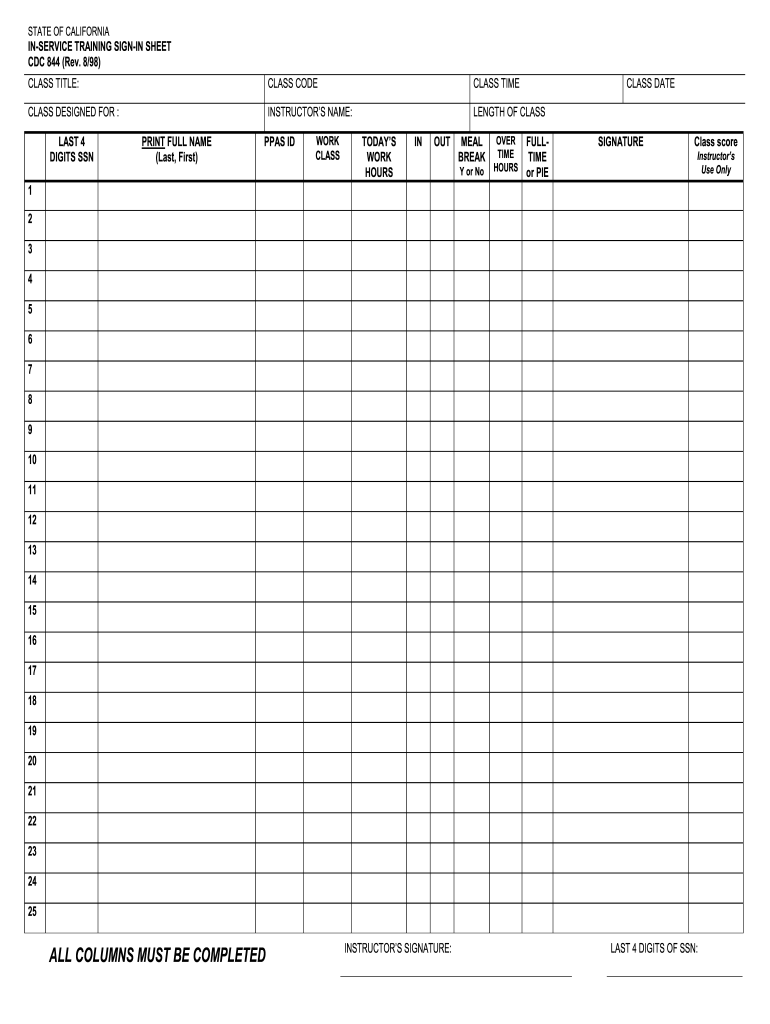
STATE OF CALIFORNIA. IN-SERVICE TRAINING SIGN-IN SHEET. CDC 844 ( Rev. 8/98). CLASS TITLE: CLASS CODE. CLASS TIME. CLASS DATE.
Loading

Open form follow the instructions

Easily sign the form with your finger

Send filled & signed form or save
How to fill out the CA CDC 844 online
The CA CDC 844 is an essential form for tracking attendance and performance in various training programs. This guide provides a clear and user-friendly approach to completing the form online, ensuring all necessary information is accurately provided.
Follow the steps to fill out the CA CDC 844 effectively
- Click ‘Get Form’ button to obtain the form and open it in the editor.
- Begin by entering the class title in the designated field. This specifies what training is being documented.
- Next, fill in the class code associated with this training session, providing a unique identifier for easy reference.
- Enter the class time when the training session is scheduled to take place.
- Indicate for whom the class is designed in the specified section, helping clarify the target audience.
- Input the instructor’s name in the appropriate field, ensuring clear identification of the trainer.
- Document the length of the class by specifying the duration in hours.
- Record the last four digits of the social security number for verification purposes. This should be done securely.
- Print the full name of each participant using the format Last, First in the provided columns, ensuring legibility.
- Fill in the PPAS ID for each participant to ensure proper identification in the system.
- Specify the work class applicable to each participant for clarity on their role.
- In the columns labeled ‘In’ and ‘Out’, document the arrival and departure times of each participant.
- Indicate whether a meal break was taken by marking ‘Y’ for Yes or ‘N’ for No in the designated section.
- Record any overtime hours worked by participants if applicable.
- Provide the date of the class in the assigned field to keep records current.
- Clarify if the individual is full-time or part-time by selecting either option in the provided section.
- Ensure each participant signs in the appropriate signature column to confirm attendance.
- The instructor should sign in the designated area as well, verifying the information provided.
- Finally, do not forget to complete the last four digits of the instructor's social security number for record-keeping.
- Review the form to ensure all columns are completed, as missing information may lead to issues.
- Once you have filled out all sections correctly, save changes to the form.
- Download the completed form as a PDF for your records or to share with relevant parties.
- Print the form if hard copies are needed for submission or documentation.
Start filling out your documents online to ensure accurate and efficient training tracking.
Experience a faster way to fill out and sign forms on the web. Access the most extensive library of templates available.
Related content
... 844-LET US NO (844-538-8766). You can also email us at letusno@dss.ca.gov or use our...
How to Contact the Center. By Phone. All consultations can be reached through one phone...
Apr 16, 2025 — A CDC analysis of population-based cancer registries found that ... CA...
Get answers to your most pressing questions about US Legal Forms API.
How to look up a childcare license in California?
To look up a childcare license in California, you can use the California Department of Social Services' online database. This resource allows you to search by facility name or license number to confirm legitimacy. Following the CA CDC 844 guidelines will enable you to find comprehensive information effortlessly.
What is an example of a type of violation of child care licensing?
An example of a type of violation of child care licensing might include inadequate supervision of children, which compromises their safety. Such violations are clearly outlined within the CA CDC 844 documentation. Understanding these violations helps parents know what to report and ensures better compliance from daycare providers.
How to look up daycare violations in California?
To look up daycare violations in California, you can visit the California Department of Social Services website. They provide access to databases where you can search for violations by specific daycares. Utilizing the CA CDC 844 framework can aid in navigating these records effectively.
How do I file a complaint against a daycare in California?
If you need to file a complaint against a daycare in California, start by documenting your concerns clearly. Submit your complaint to the local licensing office or use the CA CDC 844 form, which offers step-by-step instructions. This method ensures that your concerns are addressed in an organized manner.
How to file a complaint with community care licensing?
To file a complaint with community care licensing, gather your details and contact your local licensing office. You can also utilize the CA CDC 844 guidelines for a structured process. This ensures that your complaint is formally recognized and investigated, improving accountability in care facilities.
How to check daycare rating?
You can check a daycare's rating by visiting the California Department of Social Services website. The site provides access to specific ratings, including those related to compliance and quality standards. Using the CA CDC 844 system can help you navigate through the ratings and find trustworthy care options for your child.
How do I file a complaint against an assisted living facility in California?
To file a complaint against an assisted living facility in California, you should first gather relevant details about the situation. Then, you can submit your complaint to the California Department of Social Services or use the CA CDC 844 form for guidelines. Additionally, you may want to explore state resources to ensure your complaint reaches the right authorities.
How do I report a daycare in California?
To report a daycare in California, you can contact the California Department of Social Services. It is crucial to provide specific details regarding your concerns so they can take appropriate action. The CA CDC 844 provides resources and guidance on how to proceed with your report effectively. Knowing the right channels can help ensure the safety of children in daycare facilities.
What is the penal code 844 in California?
Penal Code 844 in California outlines the rules regarding resisting arrest and the consequences that arise from such actions. It emphasizes the responsibilities of law enforcement and the rights of individuals during an arrest. The CA CDC 844 elaborates on this important legal framework. Understanding this code can help you know what to expect during law enforcement encounters.
Is profanity illegal in California?
Like cursing, profanity is generally not illegal in California unless it violates specific laws against disorderly conduct. When profanity leads to a breach of peace, it could become actionable. The CA CDC 844 offers insight into the contexts where profanity may lead to penalties. It’s wise to be aware of how language impacts legal standing.
Use professional pre-built templates to fill in and sign documents online faster. Get access to thousands of forms.
If you believe that this page should be taken down, please follow our DMCA take down process here.