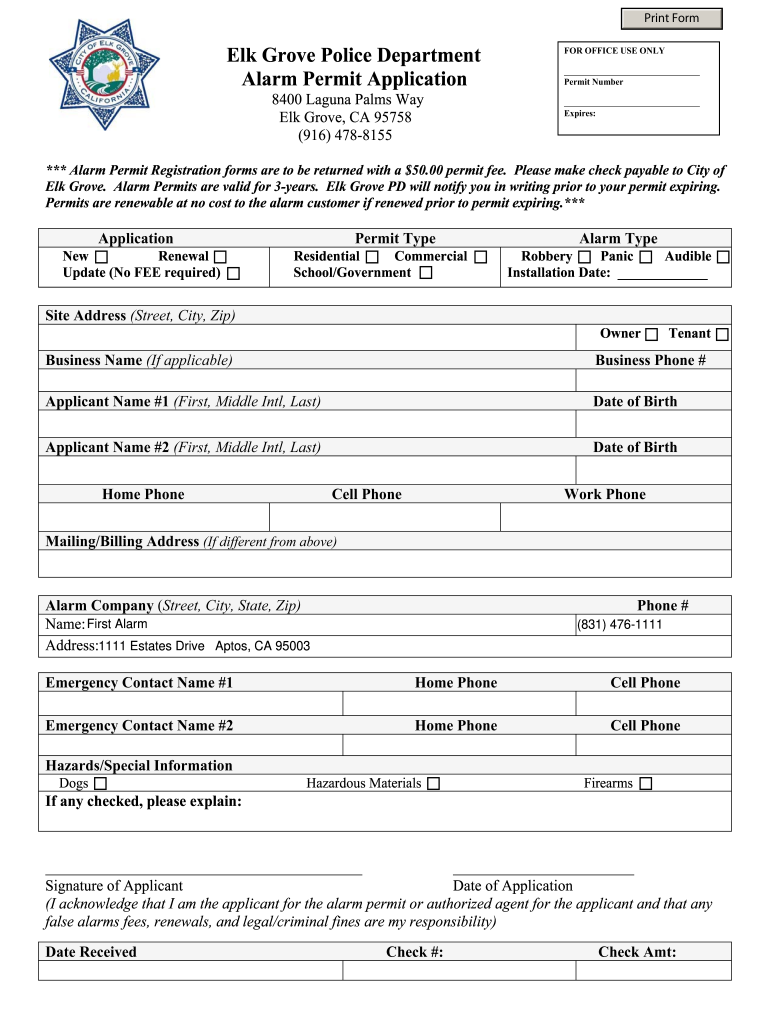
00 permit fee. Please make check payable to City of Elk Grove. Alarm Permits are valid for 3-years. Print Form Elk Grove Police Department Alarm Permit Application 8400 Laguna Palms Way Elk Grove CA 95758 916 478-8155 FOR OFFICE USE ONLY Permit Number Expires Alarm Permit Registration forms are to be returned with a 50. Elk Grove PD will notify you in writing prior to your permit expiring. Permits are renewable at no cost to the alarm customer if.

Open form follow the instructions

Easily sign the form with your finger

Send filled & signed form or save
How to fill out the CA Alarm Permit Application - Elk Grove online
Completing the CA Alarm Permit Application for Elk Grove is a straightforward process that can be done online. This guide provides clear, step-by-step instructions to help users with all experience levels accurately fill out the application.
Follow the steps to complete your application with ease.
- Click the ‘Get Form’ button to obtain the form and open it in the document editor.
- Select the type of application you are submitting: mark 'New', 'Renewal', or 'Update', providing clarity on your request.
- Choose your permit type by selecting either 'Residential', 'Commercial', or 'School/Government' to ensure appropriate classification.
- Indicate the type of alarm installed by selecting from options such as 'Robbery', 'Panic', and 'Audible'. Enter the installation date in the specified space.
- Provide the site address, including the street, city, and zip code, where the alarm will be installed.
- Identify whether you are the owner or tenant, and fill in the business name if applicable, along with the business phone number.
- Fill in the names and dates of birth of up to two applicants, along with their home, cell, and work phone numbers.
- If your mailing or billing address differs from the site address, provide the correct information in the designated space.
- List the alarm company’s details, including the name, street address, city, state, and zip code, along with the phone number.
- Provide emergency contact information for two individuals, including their names and phone numbers.
- If applicable, indicate any hazards or special information, such as pets or hazardous materials, and explain them in the provided space.
- Sign and date the application, confirming that you are the applicant or an authorized agent and acknowledging your responsibilities.
- After completing the form, save your changes, download a copy, print it out, or share it as needed.
Complete your CA Alarm Permit Application online today to ensure compliance and peace of mind.
Experience a faster way to fill out and sign forms on the web. Access the most extensive library of templates available.
Related content
The initial cost for an alarm permit is $50.00. If the permit is renewed prior to its...
Feb 12, 2024 — Click on “Create Application” to start the new application. Page...
Nov 3, 2009 — A: Dell will report the voting results by filing a current report on Form...
Get answers to your most pressing questions about US Legal Forms API.
Do you need a license to be a house alarm installer company in CA?
Yes, a license is mandatory for house alarm installer companies in California. This requirement guarantees that companies maintain ethical and professional standards. If you're starting an installation business, the CA Alarm Permit Application - Elk Grove is crucial for operating legally.
How do you know if you need an alarm permit?
To determine if you need an alarm permit, check your local government’s regulations regarding alarm systems. Local ordinances often specify the types of alarm systems that require permits. If your system involves a monitored alarm or multiple devices, consider applying for the CA Alarm Permit Application - Elk Grove to ensure compliance.
Do you need a license for alarm systems in California?
Yes, licensing is required for companies that install alarm systems in California. This process ensures that alarm installers meet specific industry standards and follow local laws. If you're planning an installation, use the CA Alarm Permit Application - Elk Grove to keep everything up to code.
Do you need an alarm permit in California?
In California, an alarm permit is generally required for residential and commercial alarm systems. This regulation helps law enforcement respond effectively to alarm activations in your area. Consider completing the CA Alarm Permit Application - Elk Grove to avoid potential fines or issues with your alarm system.
Do I need an alarm permit in California?
Yes, you typically need an alarm permit in California, including Elk Grove. Cities enforce these permits to manage alarm systems, reduce false alarms, and enhance public safety. By applying for a CA Alarm Permit Application - Elk Grove, you ensure compliance with local regulations.
How do I get a fire alarm license in California?
To acquire a fire alarm license in California, you must complete a training course and pass the required exam to show your expertise. Be sure to review the local regulations, as they can vary across regions. Additionally, the CA Alarm Permit Application - Elk Grove offers an excellent resource for managing your licensing and application process.
Do you need a C10 license to work on fire alarms in California?
Yes, a C10 license is typically required to work on fire alarms in California. This specialized license indicates proficiency in electrical work related to fire safety systems. By ensuring you have the necessary certifications, you can use the CA Alarm Permit Application - Elk Grove to streamline your permit application process.
How to get a fire alarm license in California?
To obtain a fire alarm license in California, you'll need to complete specific training programs and pass a certification exam. The requirements can vary, so it’s helpful to research local guidelines. With tools like the CA Alarm Permit Application - Elk Grove, you can efficiently manage your application and ensure compliance with state regulations.
How much do fire alarm inspectors make in California?
Fire alarm inspectors in California can expect to earn between $50,000 and $90,000 annually, depending on their experience and location. This salary reflects the importance of this role in maintaining safety standards. As you pursue a career in this field, consider how utilizing the CA Alarm Permit Application - Elk Grove can help establish your qualifications.
How to get a Ring alarm permit?
To get a Ring alarm permit, you must submit an application specific to your local jurisdiction. Elk Grove may have its own requirements, so it is essential to check local regulations. The CA Alarm Permit Application - Elk Grove can help you navigate the process efficiently, ensuring compliance with local laws.
Use professional pre-built templates to fill in and sign documents online faster. Get access to thousands of forms.
If you believe that this page should be taken down, please follow our DMCA take down process here.