Loading
Get Russian Jack Chalet
How it works
-

Open form follow the instructions
-

Easily sign the form with your finger
-

Send filled & signed form or save
How to fill out the Russian Jack Chalet online
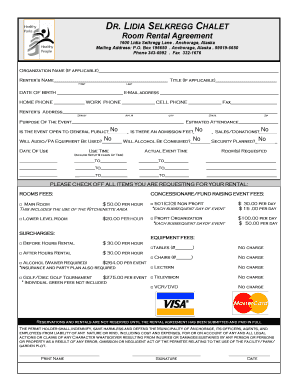
Filling out the Russian Jack Chalet room rental agreement is a straightforward process. This guide aims to walk you through each section of the form, ensuring you understand what information is required and how to submit it successfully.
Follow the steps to complete the room rental agreement efficiently.
- Click ‘Get Form’ button to access the rental agreement form and open it in the editor.
- Fill in the organization name if applicable. Next, enter the renter’s name, title, date of birth, and email address. Ensure the details are accurate to avoid any issues.
- Provide your home, work, and cell phone numbers, as well as your fax number if applicable. This information will help with communication regarding your rental.
- Complete the renter’s address field with the street, apartment number (if applicable), city, state, and zip code.
- Describe the purpose of your event and estimate the number of attendees. This helps the facility understand the context of your reservation.
- Indicate whether the event is open to the general public, whether there is an admission fee, or if sales or donations will occur.
- Specify if audio or PA equipment will be used, if alcohol will be consumed, and if security is planned. These details are critical for logistical planning.
- Provide the date of use and clearly state the use and actual event times, including setup and cleanup times.
- Select the desired rooms and any additional requested items for your rental from the checklist provided in the form.
- Review all your entries to ensure accuracy, then sign and date the form. Make sure all payments are ready before submission.
- After completing the form, save your changes, and proceed to download, print, or share the form as needed.
Complete your rental agreement online today to secure your booking!