Loading
Get $100 Fee
How it works
-

Open form follow the instructions
-

Easily sign the form with your finger
-

Send filled & signed form or save
How to fill out the $100 FEE online
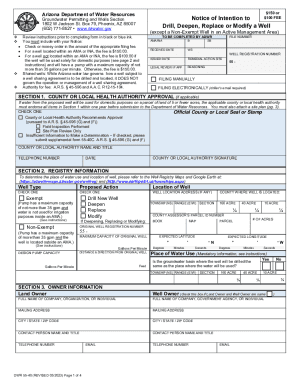
Filling out the $100 FEE form is essential for obtaining permission to drill, deepen, replace, or modify a well. This guide provides clear, step-by-step instructions to help users complete the form accurately and efficiently.
Follow the steps to complete your $100 FEE form online.
- Press the ‘Get Form’ button to access the form and open it in your preferred editor.
- Begin by reviewing the instructions carefully to ensure you understand the requirements for completing the form. Use black or blue ink when manually filling it out if necessary.
- In Section 1, if applicable, indicate whether you have obtained approval from your local health authority by checking the appropriate box and providing their details.
- Proceed to Section 2 to complete your registry information, including the well type, proposed action, and exact location details of the well. Ensure that you provide accurate township, range, and section information.
- In Section 3, provide the owner's information. If the well owner and land owner are the same, indicate this by checking the respective box.
- Section 4 presents several questions regarding the well site. Answer all questions accurately, marking 'Yes' or 'No' as applicable, and follow any additional instructions if necessary.
- Complete Section 5 with the drilling firm's information, including their name and contact details.
- In Section 6, detail the principal and other uses of water intended for the well. Be specific about any irrigation or industrial uses.
- Proceed to Section 7 for pro forma well construction design details. Attach separate sheets if necessary and ensure all specifications for casing and borehole are included.
- If required, check the box in Section 8 to grant permission for the agency to access your property for water level measurements.
- Draw your well site plan as instructed in Section 9, ensuring all required elements such as property boundaries and locations of existing systems are included.
- Finally, in Section 10, sign and date the form, ensuring all information provided is complete and accurate. Review your form thoroughly before submission.
- After completing the form, choose to save changes, download a copy, print it, or share your completed form as needed.
Complete your $100 FEE form online today for swift processing!
We've stated that the standard PayPal fees for receiving money are 2.9% + $0.30 if both accounts are from the U.S., or 4.4% + $0.30 if the client's account is from another country. In these cases, the customer doesn't have to pay any fees, even if their account is from another country.