Loading
Form preview
  • US Legal Forms
  • Other Templates
  • More Forms
  • More Multi-State Forms
  • Wi Dor Schedule Wd 2022

Get Wi Dor Schedule Wd 2022-2026

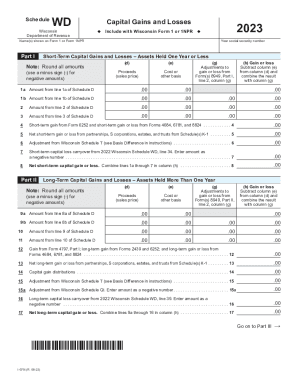
ScheduleWDWisconsin Department of RevenueCapital Gains and Losses uName(s) shown on Form 1 or Form 1NPRPart I2023Include with Wisconsin Form 1 or 1NPRuYour social security numberShortTerm Capital.

How it works

  1. Open form

    Open form follow the instructions

  2. Easily sign form

    Easily sign the form with your finger

  3. Share form

    Send filled & signed form or save

How to fill out the WI DoR Schedule WD online

Navigating the Wisconsin Department of Revenue Schedule WD can be straightforward with the right guidance. This guide will provide you with step-by-step instructions to effectively complete the form online, ensuring that you capture all necessary information accurately.

Follow the steps to complete your Schedule WD efficiently.

  1. Click ‘Get Form’ button to access the Schedule WD and open it for editing.
  2. Begin by entering your name(s) as shown on Form 1 or Form 1NPR along with your social security number at the top of the form.
  3. In Part I, provide details for short-term capital gains and losses. You'll need to fill in the proceeds and cost or other basis for each transaction held for one year or less, and make sure to round all amounts. Use a minus sign for any negative amounts and calculate the gain or loss by subtracting the cost from the proceeds.
  4. Continue detailing all short-term asset transactions, following the same process for each line. Pay special attention to adjustments which may come from Form 8949.
  5. Once you complete Part I, move on to Part II, focusing on long-term capital gains and losses. Similar to Part I, enter the required details for transactions held for more than one year.
  6. Complete all calculations necessary to determine the net long-term gain or loss from your assets, ensuring to include adjustments as required.
  7. Proceed to Part III where you will summarize the gains and losses from both short-term and long-term sections. Make sure to enter the totals accurately, as they will affect your overall capital gain or loss reporting.
  8. If applicable, complete Parts IV and V related to the computation of Wisconsin adjustments to income and capital loss carryovers. Follow the instructions closely to derive the correct figures.

Start filling out your WI DoR Schedule WD online today to ensure your capital gains and losses are reported correctly.

Get form

Experience a faster way to fill out and sign forms on the web. Access the most extensive library of templates available.
Get form

Related content

2020 I-070 Wisconsin Schedule WD, Capital Gains...
2020. Capital Gains and Losses. Name(s) shown on Form 1 or Form 1NPR. Your social security...
Learn more
DOR Withholding Tax Forms
A‑777a (Fill‑In Form)My Tax Account Authorization Fillable...
Learn more

Related links form

Aplfspk Form City Of Lacey Business Registration Form Lacey Police Explorer Form Fire Alarm System Maintenance Report

Questions & Answers

Get answers to your most pressing questions about US Legal Forms API.

Contact support

Schedule D is a form provided by the IRS to help taxpayers compute their capital gains or losses and the corresponding taxes due. The calculations from Schedule D are combined with individual tax return form 1040, which will affect the adjusted gross income amount.

Long-term capital gains tax rates for the 2023 tax year Above that income level, the rate jumps to 20 percent. In 2023, individual filers won't pay any capital gains tax if their total taxable income is $44,625 or less. The rate jumps to 15 percent on capital gains, if their income is $44,626 to $492,300.

Who Files Schedule D: Capital Gains and Losses? In general, taxpayers who have short-term capital gains, short-term capital losses, long-term capital gains, or long-term capital losses must report this information on Schedule D, an IRS form that accompanies form 1040.

Use Schedule D (Form 1040) to report the following: The sale or exchange of a capital asset not reported on another form or schedule. Gains from involuntary conversions (other than from casualty or theft) of capital assets not held for business or profit.

Capital gains and qualified dividends. For tax year 2022, the 20% maximum capital gain rate applies to estates and trusts with income above $13,700. The 0% and 15% rates continue to apply to certain threshold amounts. The 0% rate applies up to $2,800. The 15% rate applies to amounts over $2,800 and up to $13,700.

Schedule AD is used to report differences between federal and Wisconsin income. These differences are called modifications and may affect the amount you report as an addition modification on line 2 of Form 1.

How to Avoid Paying Capital Gains Tax When Buying Another Rental Property. If you use the proceeds from the sale of the second home to buy another home to rent out, you can avoid paying tax on the sale of the second home. This is known as a 1031 exchange and lets you avoid paying the tax for the time being.

Use Form 8949 to reconcile amounts that were reported to you and the IRS on Form 1099-B or 1099-S (or substitute statement) with the amounts you report on your return. The subtotals from this form will then be carried over to Schedule D (Form 1040), where gain or loss will be calculated in aggregate.

You and your spouse may list your transactions on separate forms or you may combine them. However, you must include on your Schedule D the totals from all Forms 8949 for both you and your spouse. Corporations and partnerships.

Get This Form Now!

Use professional pre-built templates to fill in and sign documents online faster. Get access to thousands of forms.
Get form
If you believe that this page should be taken down, please follow our DMCA take down processhere.
Get WI DoR Schedule WD
Get form
  • Adoption
  • Bankruptcy
  • Contractors
  • Divorce
  • Home Sales
  • Employment
  • Identity Theft
  • Incorporation
  • Landlord Tenant
  • Living Trust
  • Name Change
  • Personal Planning
  • Small Business
  • Wills & Estates
  • Packages A-Z
  • Affidavits
  • Bankruptcy
  • Bill of Sale
  • Corporate - LLC
  • Divorce
  • Employment
  • Identity Theft
  • Internet Technology
  • Landlord Tenant
  • Living Wills
  • Name Change
  • Power of Attorney
  • Real Estate
  • Small Estates
  • Wills
  • All Forms
  • Forms A-Z
  • Other Templates
  • Legal Hub
  • About Us
  • Help Portal
  • Legal Resources
  • Blog
  • Affiliates
  • Contact Us
  • Delete My Account
  • Site Map
  • Industries
  • Forms in Spanish
  • Localized Forms
  • State-specific Forms
  • Forms Kit
  • Real Estate Handbook
  • All Guides
  • Notarize
  • Incorporation services
  • For Consumers
  • For Small Business
  • For Attorneys
  • USLegal
  • FormsPass
  • pdfFiller
  • signNow
  • altaFlow
  • DocHub
  • Instapage
Form Packages
  • Adoption
  • Bankruptcy
  • Contractors
  • Divorce
  • Home Sales
  • Employment
  • Identity Theft
  • Incorporation
  • Landlord Tenant
  • Living Trust
  • Name Change
  • Personal Planning
  • Small Business
  • Wills & Estates
  • Packages A-Z
Form Categories
  • Affidavits
  • Bankruptcy
  • Bill of Sale
  • Corporate - LLC
  • Divorce
  • Employment
  • Identity Theft
  • Internet Technology
  • Landlord Tenant
  • Living Wills
  • Name Change
  • Power of Attorney
  • Real Estate
  • Small Estates
  • Wills
  • All Forms
  • Forms A-Z
  • Other Templates
Customer Service
  • Legal Hub
  • About Us
  • Help Portal
  • Legal Resources
  • Blog
  • Affiliates
  • Contact Us
  • Delete My Account
  • Site Map
  • Industries
  • Forms in Spanish
  • Localized Forms
  • State-specific Forms
  • Forms Kit
Legal Guides
  • Real Estate Handbook
  • All Guides
Prepared for you
  • Notarize
  • Incorporation services
Our Customers
  • For Consumers
  • For Small Business
  • For Attorneys
Our Sites
  • USLegal
  • FormsPass
  • pdfFiller
  • signNow
  • altaFlow
  • DocHub
  • Instapage
Social Media
Call us now toll free:
+1 833 426 79 33
As seen in:
© Copyright 1999-2026 airSlate Legal Forms, Inc. 17 Station Street, Suite 303, Brookline, MA 02445
  • Your Privacy Choices
  • Terms of Service
  • Privacy Notice
  • Content Takedown Policy
  • Bug Bounty Program