Loading
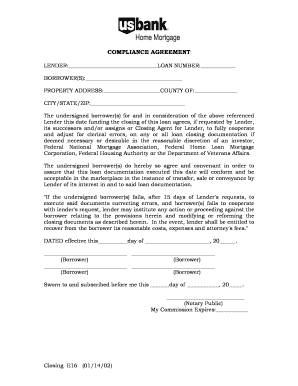
Get Closing E16
How it works
-

Open form follow the instructions
-

Easily sign the form with your finger
-

Send filled & signed form or save
How to fill out the Closing E16 online
Filling out the Closing E16 form is an essential step in the loan closing process. This guide will provide you with clear, step-by-step instructions to complete the form online, ensuring accuracy and compliance with all necessary requirements.
Follow the steps to effectively complete the Closing E16 form.
- Click ‘Get Form’ button to obtain the form and open it in the editor.
- Begin by entering the lender's name in the designated field labeled 'Lender'. Ensure that the information is accurate and clearly typed.
- Next, input the loan number in the space provided next to 'LOAN NUMBER'. This should match the information provided by your lender.
- Then, fill in the names of the borrower(s) in the 'BORROWER(S)' section. Ensure to list all individuals involved in the loan agreement.
- Continue by entering the property address in the corresponding field. Be sure to include the county name followed by the city, state, and ZIP code in their respective sections.
- Review the agreement clause carefully, which states that borrowers must cooperate with the lender regarding any clerical errors on loan documents.
- Complete the date section at the bottom of the form, indicating the effective date of the agreement. Be sure to double-check the month and year.
- Have all borrowers sign in the designated signature areas provided on the form. They should sign and print their names as needed.
- Finally, a notary public must witness the signing of the form. Fill in the date for notarization and ensure that the notary signs and provides their commission expiration date.
Complete your Closing E16 form online today and ensure a smooth closing process.
Industry-leading security and compliance
US Legal Forms protects your data by complying with industry-specific security standards.
-
In businnes since 199725+ years providing professional legal documents.
-
Accredited businessGuarantees that a business meets BBB accreditation standards in the US and Canada.
-
Secured by BraintreeValidated Level 1 PCI DSS compliant payment gateway that accepts most major credit and debit card brands from across the globe.