Loading
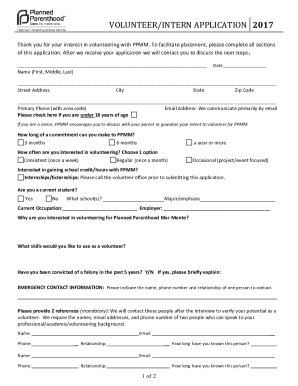
Get Templatearchive.comvolunteer-application30 Printable Volunteer Application Templates (free)
How it works
-

Open form follow the instructions
-

Easily sign the form with your finger
-

Send filled & signed form or save
How to fill out the Templatearchive.com volunteer application 30 printable volunteer application templates (Free) online
This guide provides a detailed overview of how to complete the Templatearchive.com volunteer application form effectively. By following these steps, you can ensure that you fill out the application accurately and submit it with confidence.
Follow the steps to successfully complete your application.
- Click the ‘Get Form’ button to access the volunteer application form. Once you have clicked the button, the form will open in your editor, allowing you to fill it out online.
- Begin by entering the date in the specified section at the top of the form. This helps to establish when you submitted your application.
- Provide your full name, entering your first, middle, and last names in the designated fields. Make sure to double-check the spelling for accuracy.
- Fill in your street address, city, state, and zip code. Ensure that all information is current and correctly formatted.
- Enter your primary phone number, including the area code, in the specified field. If you are under 18 years of age, check the appropriate box.
- Add your email address in the corresponding field, as most communications will take place via email.
- Indicate the length of commitment you can make to the organization by selecting one of the options: 3 months, 6 months, or a year or more.
- Choose your preferred frequency of volunteering by selecting one option: consistent (once a week), regular (once a month), or occasional (project/event focused).
- Specify if you are interested in gaining school credit/hours through your volunteering experience. Note that internships or externships may require prior communication with the volunteer office.
- Indicate your current student status by selecting 'yes' or 'no,' and if applicable, provide the name of your school and your major/emphasis.
- Enter your current occupation along with your employer's name in the respective fields.
- In the next section, explain your interest in volunteering with the organization. This is an opportunity to share your motivations and relevant experiences.
- List any skills you possess that you would like to use as a volunteer, as this information will help in matching you with suitable opportunities.
- Answer the question regarding any felony convictions in the past five years by selecting 'yes' or 'no.' If applicable, provide a brief explanation.
- Complete the emergency contact information section by providing the name, phone number, and relationship of a person to contact in case of an emergency.
- You are required to provide two references. Fill in the names, email addresses, and phone numbers, along with the nature of your relationship with these individuals.
- Review the confidentiality and non-disclosure agreement statement thoroughly. By signing, you acknowledge your commitment to confidentiality as a volunteer.
- After completing all sections of the application, sign and date the form at the bottom to confirm that all information provided is accurate to the best of your knowledge.
- Finally, you can save the changes, download a copy of your completed application, print it out, or share it as directed to submit it to the volunteer department.
Complete your volunteer application online today and take the first step toward making a positive impact.