Loading
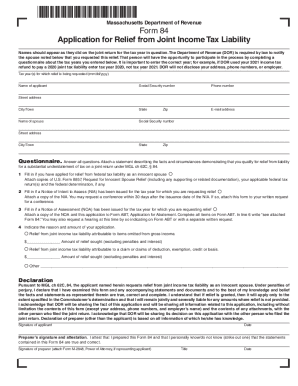
Get Ma Dor Form 84 2022-2026
How it works
-

Open form follow the instructions
-

Easily sign the form with your finger
-

Send filled & signed form or save
How to fill out the MA DoR Form 84 online
Filling out the MA DoR Form 84 online can be a straightforward process when you understand each section of the form. This guide offers step-by-step instructions to assist you in completing the application for relief from joint income tax liability accurately and efficiently.
Follow the steps to successfully complete the MA DoR Form 84 online.
- Click ‘Get Form’ button to obtain the form and open it in your chosen editor.
- Enter the tax year for which you are requesting relief in the specified field. Ensure you provide the correct year, as this information is crucial for the application process.
- Fill in your name as it appeared on your joint income tax return for the relevant tax year. Include your Social Security number, phone number, city or town, state, and email address.
- Enter your spouse's name as listed on the joint return, along with their Social Security number, street address, city or town, state, and zip code.
- Complete the questionnaire section by answering all questions honestly. This section is essential for providing the necessary facts and circumstances that justify your claim for relief.
- If applicable, indicate whether you have applied for relief from federal tax liability as an innocent spouse. Attach the required documentation, including any relevant federal tax returns and notices.
- If a Notice of Intent to Assess (NIA) has been issued, provide a copy of that notice and attach it to your application. Remember that you must request a conference promptly, within 30 days of issuance.
- If a Notice of Assessment (NOA) has been issued, include a copy of the NOA along with this application to Form ABT. Be sure to write 'see attached Form 84' on the ABT.
- Indicate the reason for your application and the amount of relief you are seeking, specifying if it is related to omitted income or claims of deductions. Provide the monetary amounts as needed.
- Review your entries to ensure all information is accurate and complete. Signature fields for both the applicant and the preparer must be signed where indicated.
- Once all sections are completed, save your changes. You may choose to download, print, or share the form as necessary.
Complete the MA DoR Form 84 online today to take the first step towards addressing your joint income tax liability.