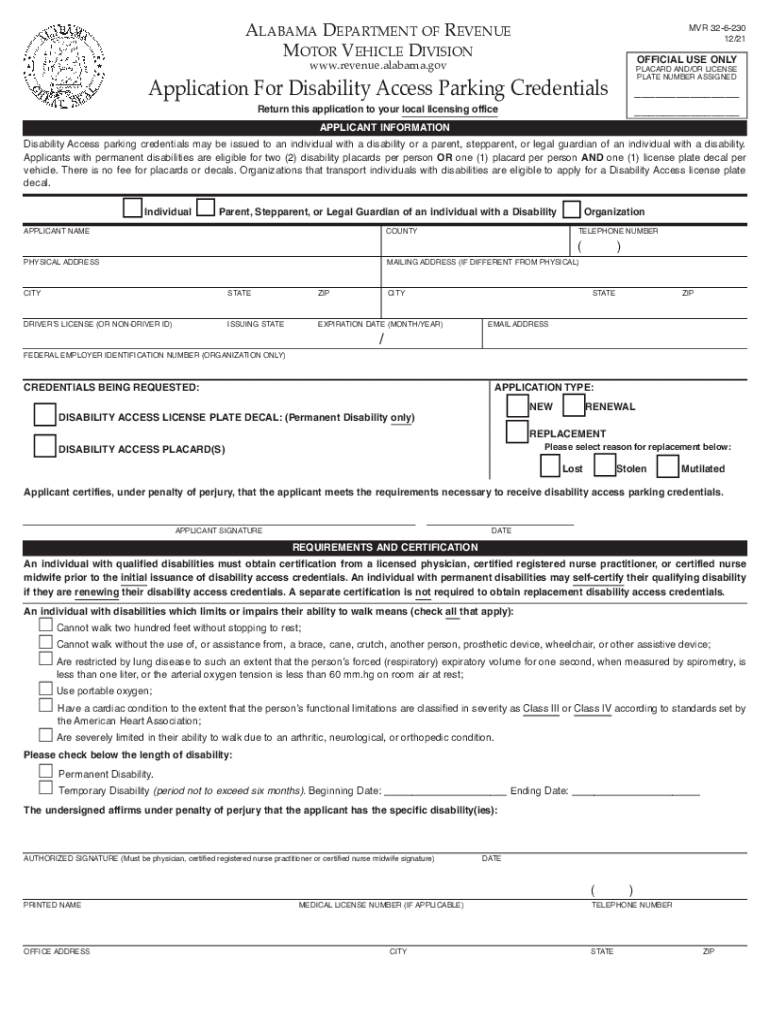
AlAbAmA DepArtment of revenue motor vehicle DivisionMVR 326230 12/21OFFICIAL USE ONLYwww.revenue.alabama.govApplication for Disability Access parking credentials Return this application to your local.
Loading

Open form follow the instructions

Easily sign the form with your finger

Send filled & signed form or save
How to fill out the AL MVR 32-6-230 online
The AL MVR 32-6-230 form is essential for individuals seeking disability access parking credentials in Alabama. This guide provides clear, step-by-step instructions for effectively completing the form online, ensuring that all users, regardless of prior legal experience, are well-supported throughout the process.
Follow the steps to successfully complete your application for disability access parking credentials.
- Click the ‘Get Form’ button to obtain the form and open it in your preferred online editing tool.
- Begin by filling in the applicant information section. Indicate whether you are applying as an individual, a parent or legal guardian of an individual with a disability, or as an organization that transports individuals with disabilities.
- Fill in the applicant's name, county, telephone number, physical address, and mailing address if it differs from the physical address.
- Provide your driver’s license number (or non-driver ID), issuing state, and expiration date.
- If applicable, enter your email address and federal employer identification number for organizations.
- Select the credentials you are requesting: either a disability access license plate decal or disability access placard(s). Ensure to specify if it is a new application, replacement, or renewal.
- If requesting a replacement, indicate the reason by checking the appropriate box, such as lost, stolen, or mutilated.
- Read the certification statement carefully, understanding that you must certify under penalty of perjury that you meet the necessary requirements.
- Sign and date the application in the designated applicant signature area.
- Complete the requirements and certification section by ensuring that a licensed physician or qualified medical professional verifies your disability status, as necessary.
- If applicable, have the authorized signatory (physician, certified registered nurse practitioner, or certified nurse midwife) sign and provide their medical license number, office address, and contact information.
- Review the completed form for accuracy. Once satisfied, save your changes, then download, print, or share the form as needed.
Take the necessary steps to complete your application online for disability access parking credentials.
Experience a faster way to fill out and sign forms on the web. Access the most extensive library of templates available.
Related content
Search for information on civil, family and probate cases. ... Criminal Case Search...
Google forms are a useful tool to help you plan events, send a survey, give students a...
Use professional pre-built templates to fill in and sign documents online faster. Get access to thousands of forms.
If you believe that this page should be taken down, please follow our DMCA take down process here.