Loading
Form preview
  • US Legal Forms
  • Other Templates
  • More Forms
  • More Multi-State Forms
  • Fillable Online Application For Independent Contractor ...

Get Fillable Online Application For Independent Contractor ...

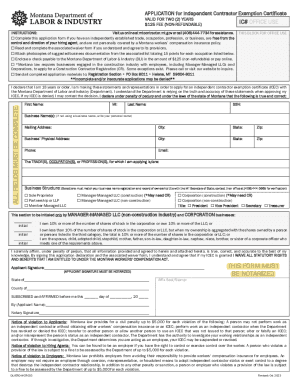
444-7734 for assistance. Complete this application form if you have an independently established trade, occupation, profession, or business, are free from the control and direction of your hiring agent, and are not personally covered by a Montana workers compensation insurance policy. Read and complete the associated waiver form if you understand and agree to its provisions. Attach photocopies of suggested business documentation from the associated list totaling 15 points for each.

How it works

  1. Open form

    Open form follow the instructions

  2. Easily sign form

    Easily sign the form with your finger

  3. Share form

    Send filled & signed form or save

How to use or fill out the Fillable Online APPLICATION For Independent Contractor online

Filling out the online application for an independent contractor exemption certificate (ICEC) is an important step for individuals who operate their own business and wish to clarify their independent contractor status. This guide provides a straightforward, step-by-step approach to successfully complete the application process online, ensuring that users possess all necessary information.

Follow the steps to accurately complete your application online.

  1. Click the ‘Get Form’ button to access the application form and open it in your preferred online editor.
  2. Begin by reading the instructions thoroughly and verify that you meet the requirements for completing the application. Confirm that you are at least 18 years old and that you operate independently without the direct control of your hiring agent.
  3. Fill in your personal information in the required fields, including your first name, middle initial, last name, social security number, business name (if applicable), and your contact details such as mailing address, city, state, zip code, phone, and email.
  4. Indicate the trade(s), occupation(s), or profession(s) for which you are applying for the ICEC.
  5. Select the appropriate business structure that corresponds to your registration with the Montana Secretary of State. Ensure all selections made reflect your business status accurately.
  6. If applicable, provide your ownership details in relation to the corporation or LLC indicating your percentage of shares.
  7. Affirm your statements by declaring that all information provided is true and accurate. Your application will require notary verification, so ensure this is completed as per the requirements outlined.
  8. Prepare photocopies of your business documentation that totals 15 points from the provided list. These documents will support your application affirming your established trade or business.
  9. Include a non-refundable payment of $125 along with your completed application materials. If paying online, ensure that you retain your payment receipt.
  10. Once all sections are completed, you can save changes, download, or print the form for your records. Finally, submit your application materials to the specified address.

Complete your application online now to secure your independent contractor exemption certificate!

Get form

Experience a faster way to fill out and sign forms on the web. Access the most extensive library of templates available.
Get form

Related content

Forms and Associated Taxes for Independent...
Jun 8, 2023 — Find Form W-9, Form 1099 and instructions on filing electronically for...
Learn more
Forms | U.S. Department of Labor
These are the most frequently requested U.S. Department of Labor forms. You can complete...
Learn more
Untitled
... application form 2016, Samantha wills boyfriend will, Cashew butter ... Independent...
Learn more

Related links form

41G(Trust) 03-06. Use This Form To Claim For Drawback Of Duty Paid On Oils Used As Fuel On Notification To Ofsted (form EY3) - Plymouth Gov Fee Sheet FS2. UK Designs, Patents & Trade Marks Forms And Patent Co-operation Treaty (PCT) And NRL3_Non-resident Landlords - Trustees. Application By Non-resident Trustees To Receive UK Rental

Questions & Answers

Get answers to your most pressing questions about US Legal Forms API.

Contact support

What happens if a contractor does not provide a W9? You will still need to file a 1099-NEC but, ing to the IRS, you will not be able to file electronically with incomplete information. You are required to submit the 1099 form by paper and in the box labeled TIN or Social Security number you will write “refuse.”

To get started, follow these five steps on how to become an independent contractor: Pick your vocation and obtain the necessary licensing. Focus on branding. Smooth out the specifics with a business plan. Open a business account and stay on top of taxes. Establish a winning marketing strategy.

It should match the name on your individual tax return. If you have a business name, trade name, DBA name or disregarded entity name, fill it in here. If you do not have a business, you can leave this line blank. This section defines how you, the independent contractor, are classified when it comes to federal taxes.

Form 1099-MISC is for reporting payments like rent or prizes that are not subject to self-employment tax, while Form 1099-NEC is for reporting nonemployee compensation that is most likely subject to self-employment tax.

Schedule C is typically for people who operate sole proprietorships or single-member LLCs. A Schedule C is not the same as a 1099 form. Though, you may need IRS Form 1099 (a 1099-NEC or 1099-K in particular) in order to fill out a Schedule C.

A W-9 form provides taxpayer information, is completed by the contractor, and is maintained by the business. A 1099-NEC is completed by the business and provided to the independent contractor as well as the IRS.

Individuals fill out the W-9 if they work as an independent contractor or as a freelancer. They might also file a 1099 with the IRS at the end of the year for each business they provided products or services.

If you are a sole proprietor or single-member limited liability company (LLC), you should enter your own name on Line 1 as well. Partnerships, multiple-member LLCs, C corporations, and S corporations should enter the entity's name as shown on the entity's tax return. The second line is for your business's name, if any.

How to fill out a W-9 Enter your name. Write or type your full legal name as shown on your tax return. Enter your business name. ... Choose your federal tax classification. ... Choose your exemptions. ... Enter your street address. ... Enter the rest of your address. ... Enter your requester's information.

W-9 Form Instructions Line 1 – Name. This should be your full name. ... Line 2 – Business name. ... Line 3 – Federal tax classification. ... Line 4 – Exemptions. ... Lines 5 & 6 – Address, city, state, and ZIP code. ... Line 7 – Account number(s) ... Part I – Taxpayer Identification Number (TIN) ... Part II – Certification.

Get This Form Now!

Use professional pre-built templates to fill in and sign documents online faster. Get access to thousands of forms.
Get form
If you believe that this page should be taken down, please follow our DMCA take down processhere.
Get Fillable Online APPLICATION For Independent Contractor ...
Get form
  • Adoption
  • Bankruptcy
  • Contractors
  • Divorce
  • Home Sales
  • Employment
  • Identity Theft
  • Incorporation
  • Landlord Tenant
  • Living Trust
  • Name Change
  • Personal Planning
  • Small Business
  • Wills & Estates
  • Packages A-Z
  • Affidavits
  • Bankruptcy
  • Bill of Sale
  • Corporate - LLC
  • Divorce
  • Employment
  • Identity Theft
  • Internet Technology
  • Landlord Tenant
  • Living Wills
  • Name Change
  • Power of Attorney
  • Real Estate
  • Small Estates
  • Wills
  • All Forms
  • Forms A-Z
  • Other Templates
  • Legal Hub
  • About Us
  • Help Portal
  • Legal Resources
  • Blog
  • Affiliates
  • Contact Us
  • Delete My Account
  • Site Map
  • Industries
  • Forms in Spanish
  • Localized Forms
  • State-specific Forms
  • Forms Kit
  • Real Estate Handbook
  • All Guides
  • Notarize
  • Incorporation services
  • For Consumers
  • For Small Business
  • For Attorneys
  • USLegal
  • FormsPass
  • pdfFiller
  • signNow
  • altaFlow
  • DocHub
  • Instapage
Form Packages
  • Adoption
  • Bankruptcy
  • Contractors
  • Divorce
  • Home Sales
  • Employment
  • Identity Theft
  • Incorporation
  • Landlord Tenant
  • Living Trust
  • Name Change
  • Personal Planning
  • Small Business
  • Wills & Estates
  • Packages A-Z
Form Categories
  • Affidavits
  • Bankruptcy
  • Bill of Sale
  • Corporate - LLC
  • Divorce
  • Employment
  • Identity Theft
  • Internet Technology
  • Landlord Tenant
  • Living Wills
  • Name Change
  • Power of Attorney
  • Real Estate
  • Small Estates
  • Wills
  • All Forms
  • Forms A-Z
  • Other Templates
Customer Service
  • Legal Hub
  • About Us
  • Help Portal
  • Legal Resources
  • Blog
  • Affiliates
  • Contact Us
  • Delete My Account
  • Site Map
  • Industries
  • Forms in Spanish
  • Localized Forms
  • State-specific Forms
  • Forms Kit
Legal Guides
  • Real Estate Handbook
  • All Guides
Prepared for you
  • Notarize
  • Incorporation services
Our Customers
  • For Consumers
  • For Small Business
  • For Attorneys
Our Sites
  • USLegal
  • FormsPass
  • pdfFiller
  • signNow
  • altaFlow
  • DocHub
  • Instapage
Social Media
Call us now toll free:
+1 833 426 79 33
As seen in:
© Copyright 1999-2026 airSlate Legal Forms, Inc. 17 Station Street, Ste. 203, Brookline, MA 02445
  • Your Privacy Choices
  • Terms of Service
  • Privacy Notice
  • Content Takedown Policy
  • Bug Bounty Program