Loading
Form preview
  • US Legal Forms
  • Other Templates
  • More Forms
  • More Multi-State Forms
  • Metlife Reimbursement Form

Get Metlife Reimbursement Form

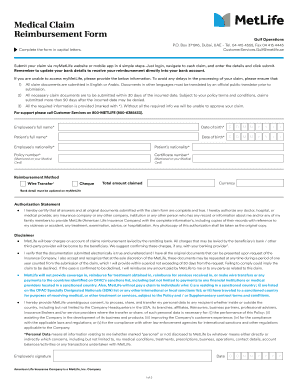
Ur claim via myMetLife website or mobile app in 4 simple steps. Just login, navigate to cash claim, and enter the details and click submit. Remember to update your bank details to receive your reimbursement directly into your bank account. If you are unable to access myMetLife, please provide the below information. To avoid any delays in the processing of your claim, please ensure that: 1) All claim documents are submitted in English or Arabic. Documents in other languages must be translated by.

How it works

  1. Open form

    Open form follow the instructions

  2. Easily sign form

    Easily sign the form with your finger

  3. Share form

    Send filled & signed form or save

How to fill out the Metlife Reimbursement Form online

Completing the Metlife Reimbursement Form online can streamline your claim process, ensuring that you receive your reimbursement efficiently. This guide provides a detailed, step-by-step approach to filling out each section of the form accurately.

Follow the steps to fill out the Metlife Reimbursement Form online.

  1. Click the ‘Get Form’ button to download and access the Metlife Reimbursement Form, where you can begin filling it out.
  2. Fill in the employee's full name and date of birth in the appropriate fields clearly and accurately.
  3. Enter the patient's full name and date of birth in their respective sections to ensure proper identification.
  4. Complete the nationality fields for both the employee and the patient by selecting or entering the correct information.
  5. Insert your policy number and certificate number as stated on your medical card to link your claim correctly.
  6. Choose your preferred reimbursement method, either 'Wire Transfer' or 'Cheque'. Make sure to update your bank details on myMetLife.
  7. Indicate the total amount claimed and the currency used, ensuring that this ties with the documents provided.
  8. Read and acknowledge the authorization statement, confirming that all answers provided are true and that you permit the necessary information to be shared.
  9. Sign and date the form to validate your submission.
  10. After completing the form, you can save your changes, download a copy for your records, print it, or share it as needed.

Start filling out your Metlife Reimbursement Form online today for a swift claims process.

Get form

Experience a faster way to fill out and sign forms on the web. Access the most extensive library of templates available.
Get form

Related content

MetLife Claim Form
Complete the template with all of the requested information below. Upon completion, use...
Learn more
FORM INSTRUCTIONS
To request reimbursement, complete and print this form, enclose a legible copy of your...
Learn more
Reflections I
Oct 29, 2011 — Reimbursement for all tuition payments collected to date​. 3. Offer to...
Learn more

Related links form

C E48 Application For A Uk Certificate Of Equivalent Competency - Dft Gov Msf 4352 Part 1 Your Application Read Guidance Notes, Part 1 - UK Border ... - Ukba Homeoffice Gov

Questions & Answers

Get answers to your most pressing questions about US Legal Forms API.

Contact support

Contact your doctor or supplier, and ask them to file a claim. If they don't file a claim, call us at 1-800-MEDICARE (1-800-633-4227). TTY: 1-877-486-2048. Ask for the exact time limit for filing a Medicare claim for the service or supply you got.

How to Fill Care Health Insurance Claim Reimbursement Form Step 1: Fill Out the Details of the Primary Insured. ... Step 2: Disclose the Insurance History of the Person Filing Claim. ... Step 3: List Down the Details of the Insured Person Hospitalized. ... Step 4: Enter the Hospitalization Information.

A reimbursement claim is when through divorce one marital estate seeks to recover money from another marital estate in a divorce.

Follow the steps given below to file a reimbursement claim under your health insurance policy: Step 1: Intimate the Insurance Company. ... Step 2: Obtain Treatment. ... Step 3: Pay the Hospital Bill. ... Step 4: Collect All Your Documents. ... Step 5: Fill Up the Claim Form. ... Step 6: Submit All the Documents to the Insurance Company.

Follow the steps given below to file a reimbursement claim under your health insurance policy: Step 1: Intimate the Insurance Company. ... Step 2: Obtain Treatment. ... Step 3: Pay the Hospital Bill. ... Step 4: Collect All Your Documents. ... Step 5: Fill Up the Claim Form. ... Step 6: Submit All the Documents to the Insurance Company.

To submit a claim, call 800-GET-MET8 (1-800-438-6388) or visit mybenefits.metlife.com or our mobile app. Have your healthcare provider's name, address, phone number, and testing information details available. Check the mail! You will receive your benefit payment within 10 days or less.

We don't require all beneficiaries to make a claim before making payment to each individual. Once MetLife approves my claim, how soon will I receive my payment? Once we approve your claim, we'll send your payment via USPS within 5 business days. Please note, mail delivery times may vary.

Submit your claim via myMetLife website or mobile app in 4 simple steps. Just login, navigate to cash claim, and enter the details and click submit. Remember to update your bank details to receive your reimbursement directly into your bank account.

Get This Form Now!

Use professional pre-built templates to fill in and sign documents online faster. Get access to thousands of forms.
Get form
If you believe that this page should be taken down, please follow our DMCA take down processhere.
Get Metlife Reimbursement Form
Get form
  • Adoption
  • Bankruptcy
  • Contractors
  • Divorce
  • Home Sales
  • Employment
  • Identity Theft
  • Incorporation
  • Landlord Tenant
  • Living Trust
  • Name Change
  • Personal Planning
  • Small Business
  • Wills & Estates
  • Packages A-Z
  • Affidavits
  • Bankruptcy
  • Bill of Sale
  • Corporate - LLC
  • Divorce
  • Employment
  • Identity Theft
  • Internet Technology
  • Landlord Tenant
  • Living Wills
  • Name Change
  • Power of Attorney
  • Real Estate
  • Small Estates
  • Wills
  • All Forms
  • Forms A-Z
  • Other Templates
  • Legal Hub
  • About Us
  • Help Portal
  • Legal Resources
  • Blog
  • Affiliates
  • Contact Us
  • Delete My Account
  • Site Map
  • Industries
  • Forms in Spanish
  • Localized Forms
  • State-specific Forms
  • Forms Kit
  • Real Estate Handbook
  • All Guides
  • Notarize
  • Incorporation services
  • For Consumers
  • For Small Business
  • For Attorneys
  • USLegal
  • FormsPass
  • pdfFiller
  • signNow
  • altaFlow
  • DocHub
  • Instapage
Form Packages
  • Adoption
  • Bankruptcy
  • Contractors
  • Divorce
  • Home Sales
  • Employment
  • Identity Theft
  • Incorporation
  • Landlord Tenant
  • Living Trust
  • Name Change
  • Personal Planning
  • Small Business
  • Wills & Estates
  • Packages A-Z
Form Categories
  • Affidavits
  • Bankruptcy
  • Bill of Sale
  • Corporate - LLC
  • Divorce
  • Employment
  • Identity Theft
  • Internet Technology
  • Landlord Tenant
  • Living Wills
  • Name Change
  • Power of Attorney
  • Real Estate
  • Small Estates
  • Wills
  • All Forms
  • Forms A-Z
  • Other Templates
Customer Service
  • Legal Hub
  • About Us
  • Help Portal
  • Legal Resources
  • Blog
  • Affiliates
  • Contact Us
  • Delete My Account
  • Site Map
  • Industries
  • Forms in Spanish
  • Localized Forms
  • State-specific Forms
  • Forms Kit
Legal Guides
  • Real Estate Handbook
  • All Guides
Prepared for you
  • Notarize
  • Incorporation services
Our Customers
  • For Consumers
  • For Small Business
  • For Attorneys
Our Sites
  • USLegal
  • FormsPass
  • pdfFiller
  • signNow
  • altaFlow
  • DocHub
  • Instapage
Social Media
Call us now toll free:
+1 833 426 79 33
As seen in:
© Copyright 1999-2026 airSlate Legal Forms, Inc. 17 Station Street, Suite 303, Brookline, MA 02445
  • Your Privacy Choices
  • Terms of Service
  • Privacy Notice
  • Content Takedown Policy
  • Bug Bounty Program