Loading
Get Ca Delta Dental 3460 2009-2026
How it works
-

Open form follow the instructions
-

Easily sign the form with your finger
-

Send filled & signed form or save
How to fill out the CA Delta Dental 3460 online
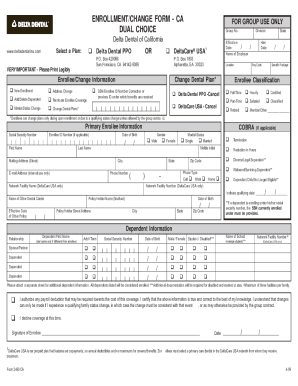
The CA Delta Dental 3460 form is essential for enrolling in or making changes to your dental coverage. This guide will provide you with clear, step-by-step instructions to help you complete the form accurately and efficiently online.
Follow the steps to fill out the CA Delta Dental 3460 form online
- Click ‘Get Form’ button to access the CA Delta Dental 3460 form and open it in your chosen editor.
- Begin by reviewing the top section of the form that indicates it is for group use only. Ensure you have your group number ready.
- Choose the type of change you wish to make from the options, such as address change, adding or deleting a dependent, terminating enrollee coverage, or changing dental plans.
- Fill in the effective date of the changes you are requesting, along with the name of your employer.
- Complete the enrollee/change information section. Enter your social security number or enrollee ID number, along with your name, mailing address, and phone number.
- If applicable, provide details about any other dental coverage you may have, including the name of the other carrier and policy holder's information.
- Fill out the dependent information section, including relationships, names, social security numbers, and dates of birth for any dependents being added or removed.
- If you are making a marital status change or reporting a dependent who is no longer eligible, be sure to indicate the qualifying date and any relevant documentation.
- Review all your entries to ensure accuracy and completeness. Be aware that incorrect information may delay processing.
- Sign and date the form at the bottom to certify that you have provided true and correct information to the best of your knowledge.
- Finally, save any changes you made, and choose to download, print, or share the completed form as needed.
Start filling out your CA Delta Dental 3460 form online today!