Loading
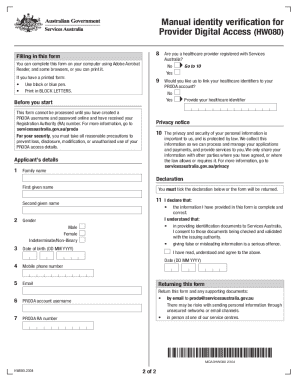
Get Au Hw080 2023-2026
How it works
-

Open form follow the instructions
-

Easily sign the form with your finger
-

Send filled & signed form or save
How to fill out the AU HW080 online
Filling out the AU HW080 form is an essential step for individuals who need to verify their identity for their Provider Digital Access (PRODA) account. This guide will provide clear, step-by-step instructions to help you complete the form accurately and efficiently.
Follow the steps to effectively complete the AU HW080 online.
- Click ‘Get Form’ button to access the AU HW080 form and open it for editing.
- Begin by entering your family name, first given name, and second given name in the designated fields.
- Select your gender by choosing from the options provided: Male, Female, or Indeterminate/Non-Binary.
- Input your date of birth using the format DD MM YYYY.
- Provide your mobile phone number and email address in the respective fields.
- Enter your PRODA account username and your Registration Authority (RA) number.
- Indicate whether you are a healthcare provider registered with Services Australia by selecting Yes or No.
- If you are a healthcare provider, indicate whether you would like to link your healthcare identifiers to your PRODA account by selecting Yes or No. If Yes, provide your healthcare identifier.
- Review the privacy notice to understand how your information will be managed.
- Tick the declaration to confirm that the information provided is complete and correct, acknowledging the implications of providing false or misleading information.
- Enter the date of submission using the format DD MM YYYY.
- Once you have completed all fields, you can save changes, download, print, or share the form as needed.
Complete your AU HW080 form online today to ensure your PRODA account is activated.