Loading
Get Nh Dor Nh-1041-es 2017
How it works
-

Open form follow the instructions
-

Easily sign the form with your finger
-

Send filled & signed form or save
How to fill out the NH DoR NH-1041-ES online
Filling out the NH DoR NH-1041-ES is an essential task for managing fiduciary business tax payments in New Hampshire. This guide provides a straightforward approach to completing the form online, ensuring that you can easily navigate each section while adhering to state requirements.
Follow the steps to complete the NH-1041-ES form online.
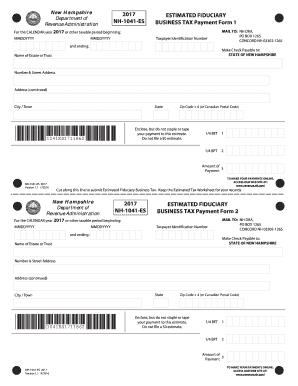
- Click ‘Get Form’ button to access the NH-1041-ES document and open it in the editor.
- Enter the calendar year or other taxable period at the top of the form in the format MMDDYYYY. This section designates the timeframe for the estimated payment.
- Fill in your taxpayer identification number accurately to ensure proper identification of your account.
- Complete the 'Name of Estate or Trust' section with the name related to the fiduciary business.
- Provide your complete address, including 'Number & Street Address,' 'City/Town,' 'State,' and 'Zip Code + 4' (or Canadian Postal Code). Ensure all information is accurate to avoid any mailing issues.
- For the payment, indicate the appropriate amount to be submitted in the 'Amount of Payment' field. This value reflects your estimated fiduciary business tax.
- After reviewing the form for completeness and accuracy, continue to save your changes. You can then download, print, or share the completed NH-1041-ES document as needed.
Complete your NH-1041-ES form online today for a seamless filing experience.
Get form
Experience a faster way to fill out and sign forms on the web. Access the most extensive library of templates available.
Get This Form Now!
Use professional pre-built templates to fill in and sign documents online faster. Get access to thousands of forms.