Loading
Get Flexfacts Fsa Spending Account Claim Form 2018-2026
How it works
-

Open form follow the instructions
-

Easily sign the form with your finger
-

Send filled & signed form or save
How to fill out the FlexFacts FSA Spending Account Claim Form online
This guide provides step-by-step instructions for completing the FlexFacts FSA Spending Account Claim Form online. By following these directions, users can ensure that their claims are submitted accurately and efficiently.
Follow the steps to complete your claim form.
- Click ‘Get Form’ button to access the claim form and open it for editing.
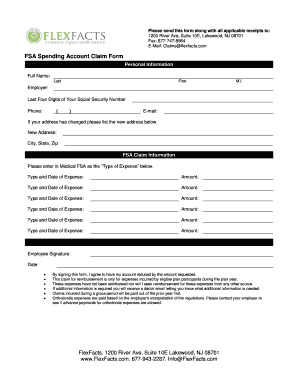
- Begin by entering your personal information. Fill in your full name, including your last name, first name, and middle initial. Next, provide your employer's name and the last four digits of your Social Security number. Don't forget to include your phone number and email address. If your address has changed, please list the new address, city, state, and zip code.
- Proceed to the FSA claim information section. Here, you will list each type of expense you are claiming. For each expense, indicate the type and date of the expense and the corresponding amount. You have space to record up to six different expenses, so ensure you provide all required details accurately.
- In the signature section, provide your signature and the date. By signing, you confirm that you agree to have your account reduced by the requested amount and that the claims are for eligible expenses incurred during the plan year, which have not been reimbursed by any other source.
- After filling out all sections, review your form to ensure that all information is accurate and complete. Once satisfied, you can save any changes you've made.
- Finally, download or print the completed claim form for your records. You may also share the form and the corresponding receipts as required to submit your claim to FlexFacts.
Start completing your FlexFacts FSA Spending Account Claim Form online today to ensure timely reimbursement.
Related links form
A Medical Flexible Spending Account (FSA) allows you to have money deducted from your pay on a pre-tax basis and put into an account that you can use to pay for eligible medical expenses. Common expenses that are eligible include; co-pays, deductibles, prescriptions, vision and dental expenses.