Loading
Get Mi Cc 99d 2018-2026
How it works
-

Open form follow the instructions
-

Easily sign the form with your finger
-

Send filled & signed form or save
How to fill out the MI CC 99d online
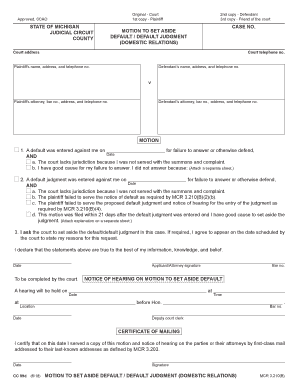
Filling out the MI CC 99d form, also known as the motion to set aside default or default judgment in domestic relations cases, can seem complex. This guide provides step-by-step instructions to help users complete the form accurately and efficiently online.
Follow the steps to fill out the MI CC 99d form.
- Click 'Get Form' button to obtain the MI CC 99d form and open it in your preferred online document editor.
- Begin by entering the case number in the designated field, ensuring it matches the records related to your specific case.
- Fill in the court address and telephone number in the provided sections to ensure proper identification of the location handling your case.
- Complete the plaintiff's name, address, and telephone number fields. This information must be accurate and current for effective communication.
- Provide the defendant's name, address, and telephone number in the appropriate sections. This ensures that all parties involved are properly identified.
- In the motion section, indicate the date when the default or default judgment was entered against you. This step is crucial for establishing context in your application.
- Articulate your reasons for requesting the default judgment to be set aside. You can check the relevant boxes to denote jurisdiction issues or provide a detailed explanation on a separate sheet if necessary.
- Sign the form where indicated to confirm that the information provided is true to the best of your knowledge. The date of your signature is also required here.
- Finalize by saving the completed form. You have options to download, print, or share the form to ensure it is filed as needed.
Complete your documents online today for a smoother filing process.
Related links form
Breadcrumb Step 1: Prepare your forms and find out how you will file. ... Step 2: Sign your Motion and have it notarized. ... Step 3: Make copies. ... Step 4: File your Motion and pay the filing fee. ... Step 5: Serve your Motion. ... Step 6: Prepare for your hearing. ... Step 7: Attend the hearing. ... Step 8: Get your Order signed by the judge.