Loading
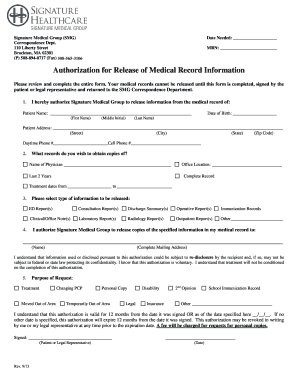
Get Ma Signature Healthcare Authorization For Release Of Medical Record Information 2013-2025
How it works
-

Open form follow the instructions
-

Easily sign the form with your finger
-

Send filled & signed form or save
How to fill out the MA Signature Healthcare Authorization For Release Of Medical Record Information online
Filling out the MA Signature Healthcare Authorization For Release Of Medical Record Information online is a straightforward process that ensures your medical records are shared efficiently. This guide provides clear instructions for each section of the form to make the process as smooth as possible.
Follow the steps to fill out the form correctly
- Press the ‘Get Form’ button to access the authorization form and open it in your preferred online editor.
- In the first section, enter the patient's full name, including first name, middle initial, last name, date of birth, and address (street, city, state, zip code). Provide daytime and cell phone numbers for contact purposes.
- Specify the records you wish to obtain copies of. Indicate the name of the physician, select either 'Last 2 Years' or 'Complete Record,' and include the treatment dates if necessary.
- Select the type of information you want to be released from the available options, including but not limited to: ED reports, consultation reports, discharge summaries, and laboratory or radiology reports. You may also add any other specific types of information in the 'Other' section.
- Designate where the records should be sent by entering the complete mailing address of the recipient. Be aware that re-disclosure of this information may occur once it is released.
- State the purpose of the request. Options include treatment, moving out of the area, changing primary care providers, or obtaining a personal copy, among others.
- Understand the duration of this authorization, which is typically valid for 12 months unless otherwise specified. Complete the expiration date if necessary.
- Sign the document, indicating whether you are the patient or a legal representative, and include the date of signing.
- If applicable, respond to the questions regarding privileged or specifically protected information by checking 'Yes' or 'No.' Initial next to the relevant sections for HIV/AIDS and genetic testing permissions.
- Finally, if you are signing on behalf of the patient as a legal guardian or representative, ensure you include a copy of the legal documentation that proves your authority to do so.
- Once you have completed and reviewed the form, save your changes, and proceed to download, print, or share the finalized document as needed.
Complete your forms online today for a more efficient process.
There are several common reasons for the release of information, including medical treatment purposes, medical billing, insurance billing, health studies, legal proceedings, and marketing purposes. Sometimes a third party — like an insurance company or an attorney — needs to request your medical information.
Industry-leading security and compliance
US Legal Forms protects your data by complying with industry-specific security standards.
-
In businnes since 199725+ years providing professional legal documents.
-
Accredited businessGuarantees that a business meets BBB accreditation standards in the US and Canada.
-
Secured by BraintreeValidated Level 1 PCI DSS compliant payment gateway that accepts most major credit and debit card brands from across the globe.