Loading
Get Mn Ps31125 2016-2026
How it works
-

Open form follow the instructions
-

Easily sign the form with your finger
-

Send filled & signed form or save
How to fill out the MN PS31125 online
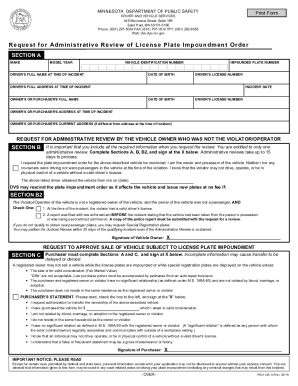
Filling out the MN PS31125 form is an important step in requesting an administrative review of a license plate impoundment order. This guide will provide you with clear and concise instructions on how to complete the form effectively.
Follow the steps to fill out the MN PS31125 online
- Click the ‘Get Form’ button to obtain the form and open it in your preferred editor.
- In Section A, fill in your vehicle details, including the make, model, year, and vehicle identification number (VIN). Next, provide the driver’s full name and date of birth at the time of the incident, followed by the impounded plate number and driver's license number.
- Continue in Section A by entering the incident date along with the driver’s full address at the time of the incident. Also, include the owner's (or purchaser's) full name, date of birth, and driver's license number.
- If the owner's current address differs from the address at the time of the incident, be sure to complete that section as well.
- Proceed to Section B and ensure you include all required information for the administrative review request. Clearly state that you are the owner and possessor of the vehicle and that neither you nor any co-owners were driving it at the time of the violation.
- In Section B2, check the appropriate box that applies to your situation regarding the violator/operator’s details and their relation to the vehicle.
- Sign your name at the designated ‘X’ spot in Section B, indicating your agreement to the statements provided.
- If you are a purchaser, complete Sections A and C. Fill in the purchase details, including the consideration amount and signing at the ‘X’ in Section C as a form of authorization.
- Review all the information provided in the form to ensure accuracy and completeness, as incomplete information may delay processing.
- Finally, save your changes, download the form, print a copy for your records, and share it as needed.
Complete your MN PS31125 form online today for a streamlined administrative review process.
Related links form
Generally, if drivers get two DWIs within 10 years or multiple DWIs over any length of time, they will be ordered to get "whiskey" plates.