Loading
Get Dc St. Marks Church Deposit Form 2016-2026
How it works
-

Open form follow the instructions
-

Easily sign the form with your finger
-

Send filled & signed form or save
How to fill out the DC St. Marks Church Deposit Form online
Filling out the DC St. Marks Church Deposit Form online is a straightforward process. This guide provides clear instructions to help you complete the form accurately and efficiently.
Follow the steps to fill out the deposit form with ease.
- Click the ‘Get Form’ button to obtain the form and open it in your preferred editor.
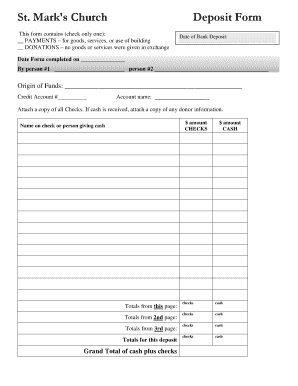
- Select one of the options provided to indicate the purpose of the deposit. You can choose either 'Payments' for goods, services, or use of the building, or 'Donations' if no goods or services were exchanged.
- Enter the date of the bank deposit in the designated field. This information is crucial for record-keeping purposes.
- Fill in the completion date of the form, along with the names of the individuals completing the form. Ensure that both boxes for 'person #1' and 'person #2' are filled out, if applicable.
- Provide details about the origin of the funds in the specified area. This should include any relevant information that explains where the funds are coming from.
- Input the credit account number in the field provided. This helps to identify where the funds should be deposited.
- Write the account name associated with the funds being deposited.
- Attach copies of all checks received. If cash is received, make sure to include copies of any relevant donor information.
- Enter the amounts for checks and cash received in their respective sections to ensure accurate totals. You will find fields to provide this information.
- Calculate the totals for the page, as well as the grand total for this deposit, which includes both cash and checks.
- Review all entered information for accuracy. Once satisfied, you can save changes, download, print, or share the completed form as needed.
Complete your documents online today for a seamless experience.