Loading
Form preview
  • US Legal Forms
  • Form Library
  • More Forms
  • More Multi-State Forms
  • Wi Et-2815 2023

Get Wi Et-2815 2023-2026

How it works

  1. Open form

    Open form follow the instructions

  2. Easily sign form

    Easily sign the form with your finger

  3. Share form

    Send filled & signed form or save

How to fill out the WI ET-2815 online

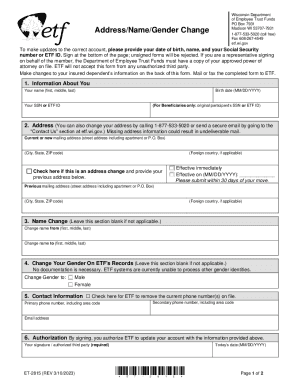
The WI ET-2815 form is used for updating your personal information, including name and gender changes, with the Wisconsin Department of Employee Trust Funds. This guide provides clear instructions on how to accurately complete the form online to ensure your changes are processed smoothly.

Follow the steps to fill out the WI ET-2815 form online effectively.

  1. Click ‘Get Form’ button to obtain the form and open it in your preferred editor.
  2. Begin by entering your personal information in the 'Information About You' section. Fill in your name (first, middle, last), birth date (MM/DD/YYYY), and your Social Security number or ETF ID.
  3. In the 'Address' section, provide your current or new mailing address, including street address, city, state, ZIP code, and foreign country if applicable. Indicate if this address change is effective immediately or on a specified date.
  4. If applicable, complete the 'Name Change' section by entering your previous and new names.
  5. For the 'Change Your Gender On ETF's Records' section, select your new gender identity. Note that no documentation is required for this change.
  6. In the 'Contact Information' section, provide your primary and secondary phone numbers, including area codes, as well as your email address. Mark the checkbox if you wish to remove current phone numbers on file.
  7. In the 'Authorization' section, sign and date the form, confirming your authorization for ETF to update your account with the provided information. Ensure your signature is included, as unsigned forms will be rejected.
  8. Finally, save your changes, and choose to download, print, or share the form as needed. Mail or fax the completed form to ETF.

Complete your form online today to ensure your information is up to date.

Get form

Experience a faster way to fill out and sign forms on the web. Access the most extensive library of templates available.
Get form

Related content

Address/Name/Gender Change
Madison WI 53707-7931. Address/Name/Gender ... Not providing all information requested on...
Learn more
My Statement of Benefits (WRS Account) | ETF
To change your address, complete an Address/Name/Gender Change (ET-2815) form. ... © 2023...
Learn more
Cardinal Health, Inc.
Aug 22, 2018 — implementation began in 2015, and upon full implementation in 2023, we...
Learn more

Related links form

NY DTF DTF-619 2010 NY DTF DTF-619 2009 NY DTF DTF-70 2014 NY DTF DTF-70 2011

Questions & Answers

Get answers to your most pressing questions about US Legal Forms API.

Contact support

Your formula benefit is based on your three highest years of earnings ("final average earnings"), a formula multiplier (based on your employment category), your years of creditable service (including any creditable military service) and an actuarial reduction if you retire before your normal retirement age.

The Statement of Benefits is a summary of your WRS retirement account available each year in mid-April. It helps you keep information up to date and track the growth of your retirement account.

Taxation of Your WRS Benefit The tax treatment of WRS benefits is generally similar for federal and Wisconsin income tax purposes. Your WRS benefit is not subject to Social Security or Medicare taxes.

Separation Benefit: A separation benefit is a 1-time payment consisting only of employee contributions, additional contributions (if applicable), and accumulated interest. You may take a separation benefit if you no longer work for a WRS employer, have not reached your minimum retirement age, and/or you are not vested.

To be eligible for a WRS retirement benefit: You must be vested and be at least age 55 (or age 50 if you have protective category service). You must terminate all WRS-covered employment. You must not be on a leave of absence or in layoff status. You must turn in a complete and valid retirement application to ETF.

The WRS Retirement Benefit is a pension plan that is intended to provide you with a lifetime retirement payment. It offers a retirement benefit based on a defined contribution plan or a defined benefit plan.

Money is paid by both the employer and the employee. A defined benefit plan means that the amount paid to you in retirement is based on a formula that is fixed, and therefore “defined”.

The WRS Retirement Benefit is a pension plan that is intended to provide you with a lifetime retirement payment. It offers a retirement benefit based on a defined contribution plan or a defined benefit plan.

Get This Form Now!

Use professional pre-built templates to fill in and sign documents online faster. Get access to thousands of forms.
Get form
If you believe that this page should be taken down, please follow our DMCA take down processhere.

Industry-leading security and compliance

US Legal Forms protects your data by complying with industry-specific security standards.
  • In businnes since 1997
    25+ years providing professional legal documents.
  • Accredited business
    Guarantees that a business meets BBB accreditation standards in the US and Canada.
  • Secured by Braintree
    Validated Level 1 PCI DSS compliant payment gateway that accepts most major credit and debit card brands from across the globe.
Get WI ET-2815
Get form
  • Adoption
  • Bankruptcy
  • Contractors
  • Divorce
  • Home Sales
  • Employment
  • Identity Theft
  • Incorporation
  • Landlord Tenant
  • Living Trust
  • Name Change
  • Personal Planning
  • Small Business
  • Wills & Estates
  • Packages A-Z
  • Affidavits
  • Bankruptcy
  • Bill of Sale
  • Corporate - LLC
  • Divorce
  • Employment
  • Identity Theft
  • Internet Technology
  • Landlord Tenant
  • Living Wills
  • Name Change
  • Power of Attorney
  • Real Estate
  • Small Estates
  • Wills
  • All Forms
  • Forms A-Z
  • Form Library
  • Legal Hub
  • About Us
  • Help Portal
  • Legal Resources
  • Blog
  • Affiliates
  • Contact Us
  • Delete My Account
  • Site Map
  • Industries
  • Forms in Spanish
  • Localized Forms
  • State-specific Forms
  • Forms Kit
  • Real Estate Handbook
  • All Guides
  • Notarize
  • Incorporation services
  • For Consumers
  • For Small Business
  • For Attorneys
  • USLegal
  • FormsPass
  • pdfFiller
  • signNow
  • altaFlow
  • DocHub
  • Instapage
Form Packages
  • Adoption
  • Bankruptcy
  • Contractors
  • Divorce
  • Home Sales
  • Employment
  • Identity Theft
  • Incorporation
  • Landlord Tenant
  • Living Trust
  • Name Change
  • Personal Planning
  • Small Business
  • Wills & Estates
  • Packages A-Z
Form Categories
  • Affidavits
  • Bankruptcy
  • Bill of Sale
  • Corporate - LLC
  • Divorce
  • Employment
  • Identity Theft
  • Internet Technology
  • Landlord Tenant
  • Living Wills
  • Name Change
  • Power of Attorney
  • Real Estate
  • Small Estates
  • Wills
  • All Forms
  • Forms A-Z
  • Form Library
Customer Service
  • Legal Hub
  • About Us
  • Help Portal
  • Legal Resources
  • Blog
  • Affiliates
  • Contact Us
  • Delete My Account
  • Site Map
  • Industries
  • Forms in Spanish
  • Localized Forms
  • State-specific Forms
  • Forms Kit
Legal Guides
  • Real Estate Handbook
  • All Guides
Prepared for you
  • Notarize
  • Incorporation services
Our Customers
  • For Consumers
  • For Small Business
  • For Attorneys
Our Sites
  • USLegal
  • FormsPass
  • pdfFiller
  • signNow
  • altaFlow
  • DocHub
  • Instapage
Social Media
Call us now toll free:
+1 833 426 79 33
As seen in:
© Copyright 1999-2026 airSlate Legal Forms, Inc. 3720 Flowood Dr, Flowood, Mississippi 39232
  • Your Privacy Choices
  • Terms of Service
  • Privacy Notice
  • Content Takedown Policy
  • Bug Bounty Program