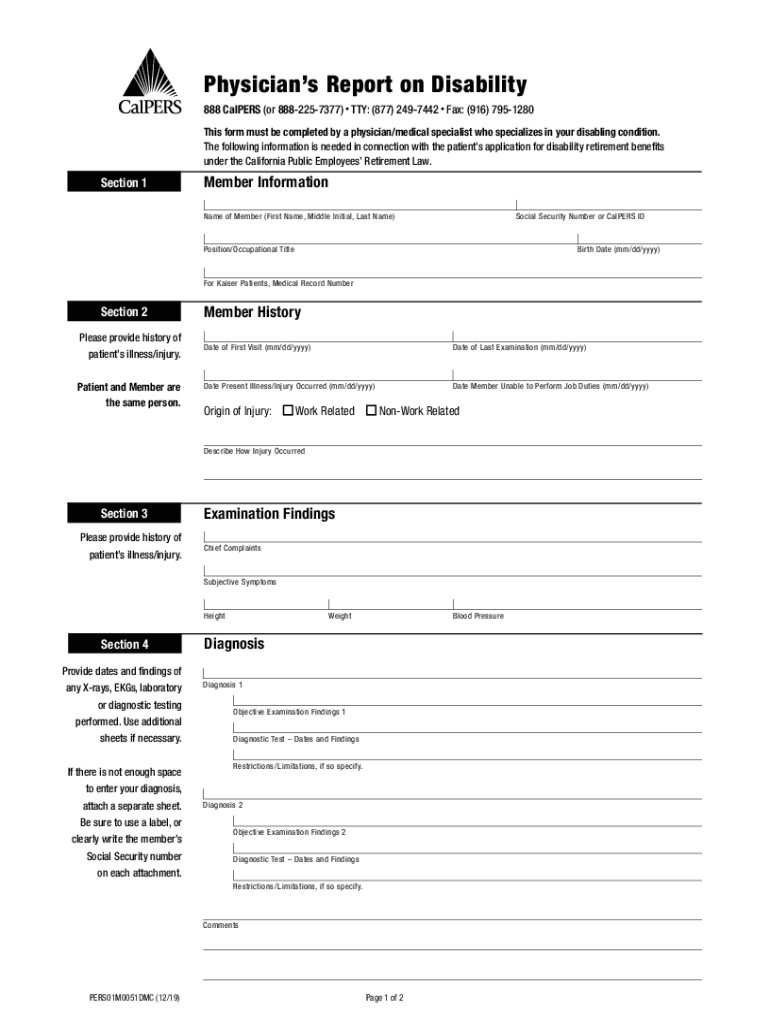
Disabling condition. The following information is needed in connection with the patient s application for disability retirement benefits under the California Public Employees Retirement Law. Section 1 Member Information Name of Member (First Name, Middle Initial, Last Name) Social Security Number or CalPERS ID Position/Occupational Title Birth Date (mm/dd/yyyy) For Kaiser Patients, Medical Record Number Section 2 Please provide history of patient s illness/injury. Patient and Memb.
Loading

Open form follow the instructions

Easily sign the form with your finger

Send filled & signed form or save
How to fill out the CA CalPERS PERS01M0051DMC online
Filling out the CA CalPERS PERS01M0051DMC form is an essential step for individuals seeking disability retirement benefits. This guide will provide clear and comprehensive instructions on how to complete the form online, ensuring all necessary information is accurately included.
Follow the steps to complete the CA CalPERS PERS01M0051DMC form online.
- Press the ‘Get Form’ button to access the form and open it for editing.
- In Section 1, enter the member information. This includes the full name of the member, Social Security number or CalPERS ID, occupational title, birth date, and for Kaiser patients, the medical record number.
- For Section 2, provide a detailed history of the patient’s illness or injury. Include the dates of the first visit, last examination, and when the present illness or injury occurred. Make sure to specify if the origin of the injury is work-related or non-work-related and describe how the injury occurred.
- In Section 3, fill out the examination findings. This consists of recording chief complaints, subjective symptoms, height, weight, blood pressure, and diagnosis. Include detailed information regarding any diagnostic tests and findings.
- Continue in Section 4, where you document additional diagnoses, objective examination findings, and any restrictions or limitations. If more space is needed for diagnoses, attach a separate sheet clearly labeled with the member’s Social Security number.
- Move to Section 5 and confirm the member incapacity. Answer the questions on whether the member is substantially incapacitated, if the incapacity is permanent, and whether relevant documents were reviewed. Make sure to attach copies of the member’s medical records and maintaining diagnostic test reports.
- In Section 6, complete and sign the physician's section. Ensure to provide all requested information including your name, Social Security number or CalPERS ID, medical specialty, and mail the completed report directly to CalPERS.
- Upon completion, save any changes made to the document. You may also download, print, or share the completed form as needed to ensure timely submission.
Take the next step towards managing disability claims by completing the CA CalPERS PERS01M0051DMC form online today.
Experience a faster way to fill out and sign forms on the web. Access the most extensive library of templates available.
Related content
This form must be completed by a physician/medical specialist who specializes in your...
www.calpers.ca.gov. REquIRED DOCuMENT CHECkLIST. Step 1 — Getting an Estimate...
Physician's Report on Disability (PERS01M0051DMC) · Report of Separation and Advance...
Get answers to your most pressing questions about US Legal Forms API.
Does CalPERS retirement run out?
Service retirement is a lifetime benefit. In most cases, the employee can retire as early as age 50 with five years of service credit. If the employee became a member on or after January 1, 2013, they must be at least 52 years old to retire.
Do I get CalPERS for life?
The 13-member Board of Administration governs CalPERS and administers benefits under the California Public Employees' Retirement Law . In a defined benefit retirement plan, pension payments are determined by a set formula and are payable for life .
What happens to your CalPERS pension after a divorce?
“We are a neutral third party and do our best to help members through the process.” If you're an active member, your CalPERS pension and health benefits are put on hold while the division of property gets sorted out. But if you're retired, half of your monthly allowance may be withheld until the claim is resolved.
How long does CalPERS pension last?
CalPERS is a 401(a) Defined Benefit Plan. This means that your benefit amount is determined by a formula and not what you contribute to the plan. Once you're eligible and you retire, your benefit is payable for life. service credit, you still may be eligible to apply for a service retirement.
Will my CalPERS pension affect my Social Security?
Your CalPERS retirement benefit can affect your Social Security benefit. And your Social Security potentially can affect both the amount of your monthly pension contributions before retirement and the amount of benefits you receive after retirement. Did you know that 33% of our retirees do not receive Social Security?
What is the average CalPERS pension?
Here are five facts to know: The average pension for all service retirees, beneficiaries, and survivors is $38,292 per year, while service retirees receive $41,040 per year. New retirees who just retired in FY 2021-22 receive $42,828 per year.
What is the average CalPERS monthly pension?
The average pension for all service retirees, beneficiaries, and survivors is $38,292 per year, while service retirees receive $41,040 per year. New retirees who just retired in FY 2021-22 receive $42,828 per year. Overall, 57% of all CalPERS service retirees receive less than $3,000 a month.
Do I lose my CalPERS pension if I quit?
If you leave all CalPERS-covered employment you can choose to withdraw your contributions plus any accrued interest. Your CalPERS pension is funded by employee contributions, employer contributions, and CalPERS investments. Any employer contributions are not eligible to be withdrawn.
Use professional pre-built templates to fill in and sign documents online faster. Get access to thousands of forms.
If you believe that this page should be taken down, please follow our DMCA take down process here.