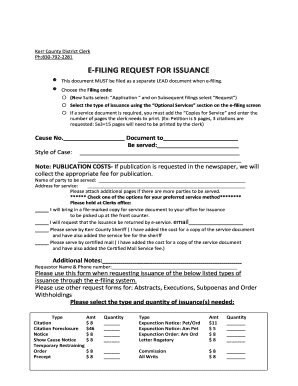
Elect: Application and on Subsequent filings select Request ) Select the type of issuance using the Optional Services section on the e-filing screen If a service document is required, you must add the Copies for Service and enter the number of pages the clerk needs to print. (Ex: Petition is 5 pages, 3 citations are requested: 5x3 15 pages will need to be printed by the clerk) Cause No. Document to Be served:.

How it works
  • Open form

    Open form follow the instructions

  • Easily sign form

    Easily sign the form with your finger

  • Share form

    Send filled & signed form or save

How to fill out the TX E-Filing Request For Issuance - Kerr County online

Filling out the TX E-Filing Request For Issuance form for Kerr County is an essential process for initiating legal documents electronically. This guide provides clear, step-by-step instructions tailored for users of all experience levels.

Follow the steps to successfully complete your e-filing request.

  1. Click ‘Get Form’ button to access the TX E-Filing Request For Issuance form. This will open the form in your online editor.
  2. Select the filing code from the drop-down menu. For new suits, choose ‘Application’. For subsequent filings, select ‘Request’.
  3. In the ‘Optional Services’ section, select the type of issuance you require. This is necessary for processing your request accurately.
  4. If you need service documents, ensure to check the box for ‘Copies for Service’ and indicate the number of pages that require printing by the clerk. For instance, if your petition is 5 pages long and you need 3 citations, you would input a total of 15 pages.
  5. Fill in the ‘Cause No.’ and the ‘Document to be served’ fields, ensuring all necessary information is provided.
  6. Enter the style of the case in the specified area. This includes the title and relevant details about the proceeding.
  7. List the name of the party to be served and provide the complete address for service.
  8. If there are additional parties to be served, attach more pages as required.
  9. Select your preferred service method by checking one of the options provided, such as holding at the Clerk's office or service by mail.
  10. Take note of any publication costs if they are applicable in your case.
  11. Finally, fill in your name and phone number as the requestor.
  12. Review all information for accuracy, then save changes, download, print, or share the completed form as needed.

Complete your TX E-Filing Request For Issuance online today to streamline your legal process.

Get form

Experience a faster way to fill out and sign forms on the web. Access the most extensive library of templates available.

Related content

Kerr County Clerk | Welcome to Kerr County |...

Jul 20, 2023 — Request for Probate Records · Pauper Burial (Policy & Application) ·...

Learn more
Underlined =new text - Kerr County

These rules govern the electronic filing and service of court documents in Kerr County...

Learn more
REQUEST FOR PROPOSAL

Sep 14, 2016 — The Purpose and Intent of this Request for Proposal (RFP) is to establish...

Learn more
Questions & Answers

Get answers to your most pressing questions about US Legal Forms API.

Contact support

Is Efiling mandatory in Texas?

e-Filing is now mandatory for all attorneys filing civil, family, probate, or criminal cases in the Supreme Court, Court of Criminal Appeals, Courts of Appeals, and all district and county courts. While not required, non-attorney filers are encouraged to file as well. Some JP Courts also permit e-Filing.

Marriage licenses can be obtained from the County Clerk's office in any county in Texas and the couple can get married in any county in Texas. Call or email the office regarding personalized vows.

You can E-File using this link: eFileTexas.Gov | Official E-Filing System for Texas, mail to Travis County District Clerk, PO Box 679003, Austin, TX 78767 or hand deliver documents to us by appointment only. Call (512) 854-9457 or send an email to District.eFile@traviscountytx.gov for any questions.

OPR (Official Public Records) $26.00 for the first page and $4.00 for each additional page. Last page must have at least 3 inches of space at the bottom or additional page fee applies. $26.00 for the first page and $4.00 for each additional page.

Real Property documents may be filed and recorded with the Travis County Clerk's Office in person or by mail. The original documents with original signatures are required for the recording. The County Clerk's Office will not record a copy. Recordings are completed immediately once received in the County Clerk's Office.

Apply for a Marriage License In-Person. $82 (CASH ONLY) You each must appear in person, and you each will need your driver's license. Absent Applicants: call 830-792-2255 to see if you qualify.

You may also call (512) 854-9457 to be connected to a clerk. To inquire on the status of a records request that you have submitted, please call (512) 854-4352.

The Travis County Clerk's office has a wide range of responsibilities including the conduct of elections; the filing and preservation of real property records; and the management of civil, probate, and misdemeanor court documents.

Get This Form Now!

Use professional pre-built templates to fill in and sign documents online faster. Get access to thousands of forms.

If you believe that this page should be taken down, please follow our DMCA take down process here.

Get TX E-Filing Request For Issuance - Kerr County