Loading
Get Co Visiontrust Communications Radio Commercial Order Form 2013-2026
How it works
-

Open form follow the instructions
-

Easily sign the form with your finger
-

Send filled & signed form or save
How to fill out the CO VisionTrust Communications Radio Commercial Order Form online
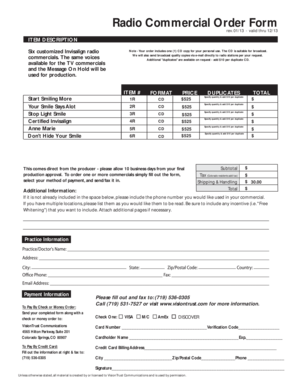
Filling out the CO VisionTrust Communications Radio Commercial Order Form online is a straightforward process that allows you to order customized radio commercials. This guide provides clear instructions to help users complete the form efficiently.
Follow the steps to fill out your order form with ease.
- Click ‘Get Form’ button to obtain the form and open it in the editor.
- Begin by entering the item descriptions for the commercials you wish to order, such as 'Start Smiling More' or 'Your Smile Says A Lot.' Each item has a corresponding format and price listed.
- Specify the quantity for each commercial you wish to purchase. Remember to add $10 for each duplicate CD requested.
- Fill in your subtotal by adding the prices of all selected commercials and any duplicates requested.
- If you are a Colorado resident, include the applicable tax in the designated field.
- Indicate any shipping and handling fees, if required, and calculate the total amount due.
- Provide the phone number you wish to be used in your commercial and list any locations or incentives you would like included.
- Complete the payment information section by choosing either credit card or check/money order, and filling out the necessary details.
- Review all entries for accuracy, then save, print, or share the form as necessary to submit your order.
Start filling out your CO VisionTrust Communications Radio Commercial Order Form online today!