Get Canada Rc96 E 2022-2026
How it works
-

Open form follow the instructions
-

Easily sign the form with your finger
-

Send filled & signed form or save
How to fill out the Canada RC96 E online
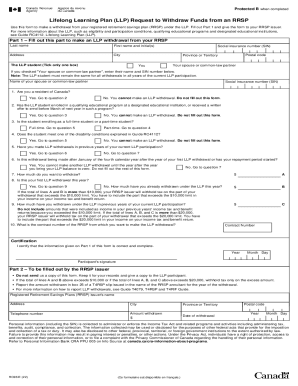
The Canada RC96 E form allows users to request a withdrawal from their registered retirement savings plan (RRSP) under the Lifelong Learning Plan (LLP). This guide provides a clear, step-by-step approach to completing the form online with user-friendly instructions.
Follow the steps to successfully fill out the form online
- Press the ‘Get Form’ button to access the form and open it in the editor.
- Fill out your personal information in Part 1, including your last name, first name and initial(s), social insurance number (SIN), address, city, province or territory, and postal code.
- Indicate whether you are the LLP student or your spouse or common-law partner by ticking the appropriate box. If selecting 'Your spouse or common-law partner', input their name and SIN as required.
- Answer question 1 regarding your residency in Canada. If you are a resident, proceed to question 2. If not, refrain from filling out the form.
- Respond to question 2, confirming if the LLP student has enrolled in a qualifying educational program. If affirmative, continue to question 3. If negative, discontinue form completion.
- For question 3, specify if the student will attend as a full-time or part-time student. Follow the appropriate path based on your answer.
- If responding to question 4, indicate whether the student meets any disability conditions outlined in the guide. If not, do not continue with the form.
- In question 5, disclose if any LLP withdrawals were made in previous years of your current participation. Depending on your answer, proceed to the corresponding next question.
- In question 6, determine if this withdrawal is after January of the fourth calendar year or if the repayment period has started. If so, stop here and do not complete the form further.
- Question 7 requires you to specify the amount you wish to withdraw. Enter this in the designated space.
- For question 8, confirm if this is your first LLP withdrawal for the year. If not, indicate how much you have withdrawn already.
- In question 9, state the cumulative amount withdrawn under the LLP in previous participation years, adhering to the instructions regarding taxation limits.
- Question 10 requests the contract number of the RRSP from which you intend to withdraw funds.
- Sign and date the certification section to affirm that your information is accurate and complete.
- Upon completing the form, users can save changes, download, print, or share the completed document.
Complete your documents online for efficient processing.
Related links form
Under LLP structure, liability of the partner is limited to his agreed contribution. Further, no partner is liable on account of the independent or un-authorized acts of other partners, thus allowing individual partners to be shielded from joint liability created by another partner's wrongful acts or misconduct. Nature of Limited Liability Parterneship (LLP) - Ministry Of Corporate Affairs mca.gov.in https://.mca.gov.in › MinistryV2 › natureoflimitedli... mca.gov.in https://.mca.gov.in › MinistryV2 › natureoflimitedli...