Loading
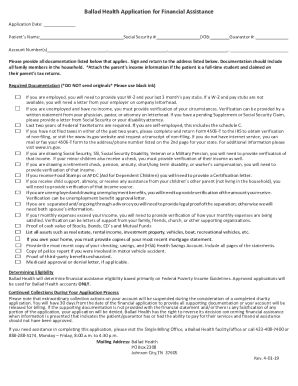
Get Ballad Health Application For Financial Assistance 2019-2026
How it works
-

Open form follow the instructions
-

Easily sign the form with your finger
-

Send filled & signed form or save
How to fill out the Ballad Health Application for Financial Assistance online
This guide provides a concise and comprehensive overview of how to fill out the Ballad Health Application for Financial Assistance online. It offers detailed instructions for each section of the application, ensuring that users have the necessary information to complete the form accurately and efficiently.
Follow the steps to successfully complete the application for financial assistance.
- Click ‘Get Form’ button to obtain the form and open it in the online editor.
- Begin by entering the application date, the patient’s name, and account number(s) in the specified fields.
- Provide the patient’s Social Security number and date of birth, ensuring all details are accurate.
- If applicable, include the guarantor's number along with any relevant documentation as specified.
- Carefully provide all required documentation listed in the form. Make sure not to send originals and use black ink.
- Ensure you attach the necessary financial documents such as W-2 forms and pay stubs, or verification letters if unemployed.
- If you have not filed taxes in the past two years, fill out Form 4506-T to obtain verification of non-filing.
- List all family members in the household and gather documentation supporting their income if applicable.
- Complete the sections detailing monthly income and expenses accurately, ensuring that all calculations are correct.
- Review the entire application for accuracy, ensuring that no pertinent information is omitted.
- Sign and date the application to certify that all information provided is true.
- Once completed, save the changes, and choose to download, print, or share the form as needed.
Start filling out your Ballad Health Application for Financial Assistance online today.
Related links form
It's your story. We're listening.