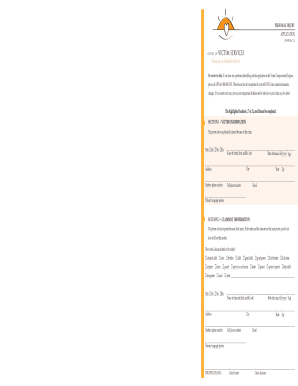
Please know that it is important that you tell OVS if your contact information changes. If we cannot reach you, you may miss important deadlines set by state law or your claim may be closed. The highlighted Sections 1, 7 or 7a, and 10 must be completed. SECTION 1 VICTIM INFORMATION The person who was physically injured because of the crime. Title: Mr. Ms. Mx. Name of victim (first, middle, last) Birth date (mm/dd/yyyy) Age City Address Daytime phone number Cell phone.

How it works
  • Open form

    Open form follow the instructions

  • Easily sign form

    Easily sign the form with your finger

  • Share form

    Send filled & signed form or save

How to fill out the Personal Injury Application - Connecticut Judicial Branch online

This guide provides a clear and comprehensive overview of how to complete the Personal Injury Application online for the Connecticut Judicial Branch. Users can navigate the form efficiently, ensuring all necessary information is accurately submitted.

Follow the steps to successfully complete your application.

  1. Press the ‘Get Form’ button to access the Personal Injury Application. This will allow you to open the form in the online editor.
  2. Begin by completing Section 1, which requires information about the victim. Enter the title, full name, birth date, age, address, phone numbers, email, and primary language spoken.
  3. If the victim and claimant are different, fill out Section 2 with the claimant's information, including their relationship to the victim, title, name, birth date, contact details, and primary language spoken.
  4. Proceed to Section 3 if you are completing this on behalf of a minor or incapacitated adult. Enter the parent, legal guardian, or conservator's details, including name, address, phone number, and relationship to the victim.
  5. In Section 4, indicate whether you have legal representation. If yes, provide the attorney's name, firm, and contact details.
  6. Complete Section 5 if you authorize contact with someone else for communication regarding the claim. Include their details and how you know them.
  7. Section 6 is optional, where you can provide statistical information about the victim, such as demographics and how you learned about the Victim Compensation Program.
  8. Move on to Section 7 or Section 7a to describe the crime, focusing on its details, reporting, and police involvement. Choose the relevant section based on the crime type.
  9. In Section 8, if applicable, provide details about any offenders, including whether anyone was arrested and known docket numbers.
  10. Fill out Section 9 to report any crime-related expenses and financial resources available. It’s important to list all applicable expenses even if you currently have none.
  11. Finally, complete Section 10, signing to certify that the information is truthful and accurate. Review all sections for completeness before submission.

Complete your Personal Injury Application online to ensure prompt assistance and access to benefits.

Get form

Experience a faster way to fill out and sign forms on the web. Access the most extensive library of templates available.

Related content

personal injury application - Connecticut Judicial...

We are here to help. If you have any questions about filling out this application or the...

Learn more
APPLICATION FOR RELIEF FROM ABUSE

Use a typewriter, print clearly in ink, or fill out on-line. You must also fill out an...

Learn more
 Legal Process Guidelines

If you are inquiring regarding the status of a specific subpoena, search warrant, or court...

Learn more
Questions & Answers

Get answers to your most pressing questions about US Legal Forms API.

Contact support

How do I look up divorces in CT?

To obtain a copy of a Divorce Decree or Dissolution of Civil Union Decree, contact the CT Superior Court where the divorce or dissolution was granted (see Directory of Connecticut Superior Courts).

You may also call the Centralized Services Unit at 860-263-2750. All requests for files must include the name of the case and docket number. Docket numbers may be available on-line at .jud.ct.gov by utilizing the case look-up function. Files should be available within one or two business days.

Although there are federal laws that make restraining orders inaccessible on public websites, these orders are public record once you are inside a courthouse. Anyone can ask the clerk to look up a file with your name and read the restraining order.

Make copies and file the original Appearance form with the clerk's Office. Make a copy of the signed form for your own records and file the original with the Clerk's Office in the court where the case is filed. Make copies to send to the other parties in the case.

Unlike many other states, a disclosure to a certified domestic violence counselor advocate, like those at DVCC, is all that is needed. Connecticut's Victim Compensation Program is for victims of crimes that were committed within the geographic bounds of the state.

There are three ways to look at court records: Go to the courthouse and ask to look at paper records. Go to the courthouse and look at electronic court records. If your court offers it, look at electronic records over the internet. This is called “remote access.”

If you can not make your court date for a Connecticut court case, you should promptly call the case coordinator clerk at that Superior Court clerk's office. The case coordinator clerk is the one in charge of all the court case scheduling. They could tell you on how to correctly request a new court date.

Get This Form Now!

Use professional pre-built templates to fill in and sign documents online faster. Get access to thousands of forms.

If you believe that this page should be taken down, please follow our DMCA take down process here.

Get Personal Injury Application - Connecticut Judicial Branch