Loading
Get Fillable Online Refund Request Form - Simply Energy Fax ...
How it works
-

Open form follow the instructions
-

Easily sign the form with your finger
-

Send filled & signed form or save
How to fill out the Fillable Online Refund Request Form - Simply Energy Fax
This guide provides clear, step-by-step instructions on how to effectively fill out the Fillable Online Refund Request Form from Simply Energy. By following these guidelines, you will ensure that your refund request is submitted accurately and promptly.
Follow the steps to fill out your refund request form online.
- Click ‘Get Form’ button to obtain the form and open it in the editor.
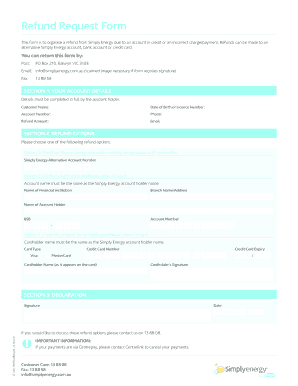
- In Section 1, input your account details fully. This includes your customer name, date of birth or license number, account number, phone number, refund amount, and email address.
- Proceed to Section 2, where you will select your desired refund option. Choose one of the three options available, and provide additional information as required for each specific refund method.
- If you select Option 1, provide your existing Simply Energy alternative account number. For Option 2, fill in your bank account details, including the name of the financial institution, branch name, account holder name, BSB, and account number. If you choose Option 3, include the card type, credit card number, cardholder name, expiry date, and signature.
- In Section 3, complete the declaration by providing your signature and the date of submission.
- Once you have filled out all sections, review your information for accuracy, then save your changes, download, print, or share the form as necessary.
Complete your refund request online today to ensure a seamless processing experience.