Loading
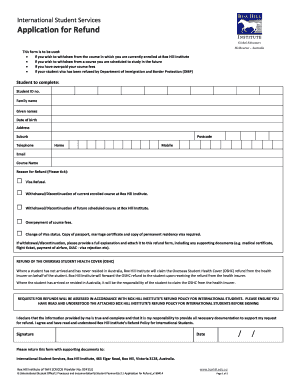
Get Au Box Hill Institute Of Tafe M2741 2014
How it works
-

Open form follow the instructions
-

Easily sign the form with your finger
-

Send filled & signed form or save
How to fill out the AU Box Hill Institute Of TAFE M2741 online
This guide provides a comprehensive overview of how to effectively complete the AU Box Hill Institute Of TAFE M2741 online form. Whether you are withdrawing from a course or seeking a refund, this guide will support you through each step of the process.
Follow the steps to complete your application for refund successfully.
- Click the ‘Get Form’ button to obtain the application for refund form and access it for completion.
- Begin by entering your student ID number in the designated field. This number is crucial as it identifies your records at Box Hill Institute.
- Next, fill in your family name and given names as they appear on your official documents.
- Enter your date of birth in the specified format, ensuring accuracy to avoid any delays.
- Provide your current residential address including suburb and postcode. This information is essential for communication purposes.
- Indicate your home telephone number and mobile phone number, allowing the institution to reach you easily.
- Include your email address for electronic correspondence regarding your refund application.
- Select the name of the course from which you are withdrawing or for which you are requesting a refund.
- Tick the appropriate box to signify the reason for your refund request. This may include visa refusal, course withdrawal, overpayment, or a change in visa status.
- If you are withdrawing, provide a full explanation of your circumstances in the attached document, including any necessary supporting materials such as a medical certificate or visa rejection notice.
- For the refund of your Overseas Student Health Cover (OSHC), specify if you have arrived in Australia and fill in all relevant details if you expect a refund.
- Review all entered information for accuracy before proceeding to the signature section where you must certify the truthfulness of your statements.
- Sign and date the form to formally submit your application.
- Submit the completed form with all supporting documents to the designated International Student Services address.
- If opting for a bank payment refund, ensure that the bank details are filled correctly, including account name, number, BSB, and SWIFT code if applicable.
- Lastly, save any changes made, and consider downloading, printing, or sharing the completed form for your records.
Complete your form online today to ensure a smooth refund process!
Get form
Experience a faster way to fill out and sign forms on the web. Access the most extensive library of templates available.
Related links form
RMIT offers both university and TAFE courses, and either can lead to personally and financially rewarding careers. University or TAFE? rmit.edu.au https://.rmit.edu.au › school-leaver › university-vers... rmit.edu.au https://.rmit.edu.au › school-leaver › university-vers...
Get This Form Now!
Use professional pre-built templates to fill in and sign documents online faster. Get access to thousands of forms.
Industry-leading security and compliance
US Legal Forms protects your data by complying with industry-specific security standards.
-
In businnes since 199725+ years providing professional legal documents.
-
Accredited businessGuarantees that a business meets BBB accreditation standards in the US and Canada.
-
Secured by BraintreeValidated Level 1 PCI DSS compliant payment gateway that accepts most major credit and debit card brands from across the globe.